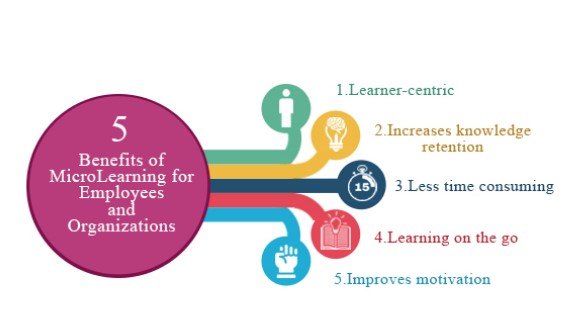

Strong training content shapes skill growth, safety habits, and daily work quality. Animated learning media now guides many training plans, and teams expect clarity, pace, and visual order. Viewers value rhythm, tone, and message flow, so every frame must respect consistency in voice and structure. Brands that invest in clear planning see higher watch time, higher recall, and better test scores. Many training leaders search for e-learning video production partners that keep consistency across style, pacing, and delivery.
A clear plan guides script flow, scene length, and graphic tone. Animation adds motion that supports memory and attention, so each cue must respect consistency across transitions and colors. Learners trust material that feels stable and well paced, and this trust builds focus. A steady production model keeps budget control and timeline order. This discipline defines high quality animated e-learning videos with measurable learning value and visible consistency.
Understanding the Role of Animation in Learning
Animation explains steps that static slides fail to show. Motion supports spatial memory and reduces reading load, and this link builds consistency in learner response. Clear icons, arrows, and timed reveals guide attention to one idea per frame. Each sequence follows a pattern that trains the eye and supports consistency across lessons. Teams that master these rules deliver better retention and fewer support calls.
Short visual stories match human memory cycles. A learner tracks a simple path from problem to action to result, and this pattern keeps consistency in message flow. Animated cues replace long text blocks and hold focus for longer sessions. Trainers gain a repeatable method that supports scale and brand voice consistency. This structure explains the rising demand for animated e-learning videos across compliance, onboarding, and sales training.
Setting Clear Learning Objectives
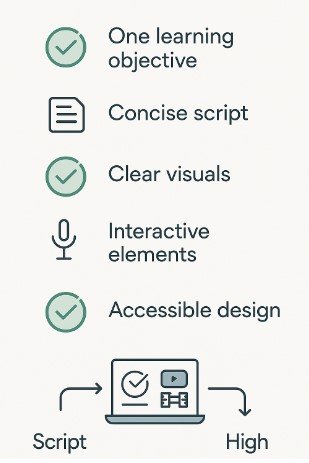
Every project starts with a defined goal and a learner profile. A clear objective guides script length, scene depth, and quiz style, and this planning supports consistency. Teams list three outcomes and map each to a visual action. This map avoids content drift and keeps tone steady across modules. Trainers measure progress with simple tests that reflect the same structure and consistency.
Learning goals shape the animation style and pace. Safety training favors calm motion and stable colors, and this supports emotional consistency. Sales training uses faster cuts and bold charts that still keep brand consistency. A stable rule set helps writers and animators align their work. Many e-learning video production teams follow this method to protect quality and delivery consistency.
Scriptwriting for Animated Learning
A strong script reads like a spoken guide and avoids long clauses. Each sentence carries one idea and keeps rhythm for voice clarity and consistency. Writers choose simple verbs and short phrases that support clear timing. Repeated phrasing across lessons builds memory and reinforces consistency. Review cycles remove filler words and tighten message flow.
Visual notes sit next to each line of script. These notes guide camera moves, icons, and charts with visual consistency. A fixed template speeds reviews and keeps production order steady. This method reduces rework and protects schedule consistency. Professional teams that produce animated e-learning videos rely on this discipline to keep cost and quality in balance with consistency.
Storyboarding and Visual Planning
Storyboards convert script lines into frame logic. Each panel shows layout, motion cue, and text block with clear consistency rules. Designers use grid systems and spacing guides to keep balance across screens. This structure lowers visual noise and keeps learner focus steady. A stable storyboard format also supports handoff clarity and team consistency.
Color palettes and icon sets remain fixed across the course. This visual order builds brand memory and learning consistency. Viewers recognize patterns and predict flow, so cognitive load drops. Teams store assets in shared libraries to protect file consistency. Many video production companies in Kolkata follow this system to meet client brand rules with consistency.
Choosing the Right Animation Style
Flat motion suits policy training and data slides. Character animation fits soft skill topics and role play, and this match supports narrative consistency. Whiteboard style works for step training with a calm tempo that keeps visual consistency. The key is a stable style guide that defines stroke weight, motion speed, and text scale. This guide prevents random choices and protects visual consistency.
Style choice affects production speed and cost. A simple motion set reduces render time and keeps schedule consistency. Complex rigs raise review cycles and risk drift in visual consistency. Teams align style choice with timeline and learner need to protect project consistency. Many clients who seek e-learning video production value this clarity in planning and delivery consistency.
Voice, Music, and Sound Design
Voice tone guides learner trust and pacing. A steady voice profile across modules supports auditory consistency. Pronunciation rules and pacing notes guide narrators during recording. Clean audio removes distractions and keeps message clarity consistent. Audio checks run before animation lock to protect workflow consistency.
Music adds mood but must stay light and steady. Repeating a small theme builds brand recall and emotional consistency. Volume rules protect voice clarity and prevent fatigue. Sound effects stay subtle and repeat in the same contexts for behavioral consistency. High quality animated e-learning videos respect these sound rules to maintain learner focus and consistency.
Editing and Post Production Workflow
Editing shapes timing, transitions, and text rhythm. A fixed cut style keeps scene flow steady and supports visual consistency. Editors follow a shared timeline template that locks intro length and outro format. This template speeds delivery and protects brand consistency. Review rounds follow a checklist to catch drift and restore consistency.
Compression and export settings affect clarity across devices. A single preset avoids playback issues and supports technical consistency. File naming rules protect asset tracking and audit clarity. Version logs track changes and keep approval history consistent. Many video production companies in Kolkata use this system to manage volume work with consistency.
Accessibility and Learning Compliance
Captions support hearing access and search indexing. A fixed caption style keeps reading flow steady and protects visual consistency. Font size and contrast meet global standards and reduce eye strain. Transcript files follow a naming rule to protect archive consistency. Accessibility audits run at each release stage to protect compliance consistency.
Screen reader tags and alt text support inclusive learning. Simple phrasing helps clarity and keeps tone consistency. Keyboard navigation tests verify player control order and functional consistency. These steps reduce risk and build trust with learners. Strong e-learning video production teams treat accessibility as a core quality rule tied to consistency.
Measuring Performance and Feedback
Analytics track watch time, drop points, and quiz scores. A standard dashboard keeps reporting format consistent. Teams compare data across cohorts and adjust content flow to restore learning consistency. Short surveys capture learner sentiment in a structured form. Feedback cycles follow a calendar that supports review consistency.
A data log stores change history and test results. This record guides future updates and protects version consistency. Clear metrics support budget planning and content scale control. Teams refine scripts and visuals using these signals to sustain quality consistency. Strong animated e-learning videos evolve through this measured cycle with visible consistency.
Choosing a Production Partner in Kolkata
Local studios support faster coordination, clear review cycles, and direct access to creative teams. Face to face meetings shorten feedback loops and reduce rework, which supports schedule consistency and delivery accuracy. Many organizations search for video production companies in Kolkata that follow strict workflow order, stable staffing, and repeatable quality checks. A studio visit reveals asset handling practice, file security rules, and review discipline, all of which signal long term consistency.
Client references provide proof of delivery habits and revision control standards. A stable portfolio shows repeat color use, steady pacing, and uniform typography, which confirm visual consistency. Contract terms define scope limits, review rounds, and change control that protect budget consistency. Teams that value predictable timelines and steady output focus on these signals to protect learning program stability and operational consistency.
Cputek in E Learning Video Production
- Structured Production Model: Cputek follows a structured production model that prioritizes planning accuracy, disciplined execution, and repeat quality checks to maintain workflow consistency.
- Clear Script and Visual Framework: Each project begins with a clear script framework, fixed visual rules, and stable review cycles that protect production consistency from kickoff through final delivery.
- Predictable Schedules and Brand Alignment: Clients receive predictable schedules, accurate brand alignment, and controlled asset handling that maintain consistency across large training libraries.
- Internal Style Guides and Asset Libraries: Internal style guides define layout rules, typography use, and motion pacing to protect tone and visual consistency across long programs. Shared asset libraries support reuse of icons, charts, and motion elements, which protects brand consistency and reduces rework cycles.
- Version Tracking and File Control: Version tracking systems maintain change history, audit clarity, and file control consistency across all stages of production.
- Unified Operating Standards Across Teams: Designers, editors, and voice teams follow the same operating standards, which reduces revision risk and protects timeline consistency.
- Clear Communication and Review Discipline: Clear communication practice supports alignment during reviews and prevents scope drift that disrupts delivery consistency.
- Trusted Partner for Scalable Learning Programs: Organizations that invest in e-learning video production often select Cputek for reliable workflow discipline, stable delivery records, and consistent execution across learning campaigns.
Why E Learning Exists in Modern Training
The details are followed below.
Consistent Training Across Locations
E learning delivers structured training through digital platforms that staff can access at any time. Companies train teams across offices, shifts, and regions, and classroom sessions struggle to keep message consistency. Digital modules deliver the same content, visuals, and pacing to every learner, which protects policy accuracy and operational consistency. Training managers value this control when tracking skill standards and safety habits.
Faster Knowledge Distribution
Digital delivery shortens training rollout time for product updates and rule changes. Teams publish content quickly and reach large groups without travel delays or room limits. Learners complete lessons during work gaps or remote schedules, which improves completion consistency. This access model supports workforce flexibility and predictable training coverage.
Lower Long Term Training Cost
Cost control drives adoption across large organizations. Once a module is built, repeat use requires minimal spending. Travel costs, instructor fees, and printed material drop sharply, which stabilizes training budgets and reporting consistency. Finance teams prefer this model for forecast clarity and predictable annual planning.
Measurable Learning Performance
Performance tracking strengthens accountability across departments. Learning platforms record completion time, test scores, and retry patterns. Managers review this data to confirm knowledge transfer consistency and audit readiness. Classroom programs rarely provide this depth of reporting control.
Visual Learning for Complex Tasks
Visual instruction supports complex work procedures and safety behavior. Motion explains process order, safety steps, and system flow with higher clarity than text alone. This strength explains the growing reliance on animated e-learning videos across manufacturing, healthcare, finance, and logistics sectors. Organizations that invest in structured e-learning video production gain scalable training delivery, measurable performance control, and long term content stability with steady consistency.
Conclusion
Organizations that adopt animated e-learning videos gain long term content value, faster onboarding cycles, and measurable performance tracking with steady consistency. Partner choice shapes success, and firms that evaluate workflow order, asset control, and review discipline reduce delivery risk and protect budget consistency. Teams that work with trusted providers such as Cputek strengthen brand alignment, production stability, and learning reliability through consistent execution and accountable governance.
Frequently Asked Questions
What length works best for animated training videos
Short modules between three and seven minutes hold attention and support memory consistency. This range allows one topic per segment and keeps pacing steady for cognitive consistency. Teams link several short clips into a learning path to protect flow consistency. Learners prefer this format for mobile access and time control with strong consistency.
How often should animated courses receive updates
Annual reviews keep policy and product data current and protect content consistency. High change sectors run quarterly checks to maintain accuracy consistency. A fixed review calendar supports planning clarity and workload consistency. Version tracking logs each change to preserve audit consistency.
Can animation fit technical and compliance topics
Yes, diagrams, callouts, and motion steps explain rules and processes with visual consistency. Complex flows break into short scenes that maintain message consistency. Clear labels and repeat icons reduce confusion and support recall consistency. Many regulated firms adopt animated e-learning videos for this reason and value the stable consistency.