How to create impactful E – learnning videos with animation

Strong training content shapes skill growth, safety habits, and daily work quality. Animated learning media now guides many training plans, and teams expect clarity, pace, and visual order. Viewers value rhythm, tone, and message flow, so every frame must respect consistency in voice and structure. Brands that invest in clear planning see higher watch time, higher recall, and better test scores. Many training leaders search for e-learning video production partners that keep consistency across style, pacing, and delivery.

A clear plan guides script flow, scene length, and graphic tone. Animation adds motion that supports memory and attention, so each cue must respect consistency across transitions and colors. Learners trust material that feels stable and well paced, and this trust builds focus. A steady production model keeps budget control and timeline order. This discipline defines high quality animated e-learning videos with measurable learning value and visible consistency.

Understanding the Role of Animation in Learning

Animation explains steps that static slides fail to show. Motion supports spatial memory and reduces reading load, and this link builds consistency in learner response. Clear icons, arrows, and timed reveals guide attention to one idea per frame. Each sequence follows a pattern that trains the eye and supports consistency across lessons. Teams that master these rules deliver better retention and fewer support calls.

Short visual stories match human memory cycles. A learner tracks a simple path from problem to action to result, and this pattern keeps consistency in message flow. Animated cues replace long text blocks and hold focus for longer sessions. Trainers gain a repeatable method that supports scale and brand voice consistency. This structure explains the rising demand for animated e-learning videos across compliance, onboarding, and sales training.

Setting Clear Learning Objectives

Every project starts with a defined goal and a learner profile. A clear objective guides script length, scene depth, and quiz style, and this planning supports consistency. Teams list three outcomes and map each to a visual action. This map avoids content drift and keeps tone steady across modules. Trainers measure progress with simple tests that reflect the same structure and consistency.

Learning goals shape the animation style and pace. Safety training favors calm motion and stable colors, and this supports emotional consistency. Sales training uses faster cuts and bold charts that still keep brand consistency. A stable rule set helps writers and animators align their work. Many e-learning video production teams follow this method to protect quality and delivery consistency.

Scriptwriting for Animated Learning

A strong script reads like a spoken guide and avoids long clauses. Each sentence carries one idea and keeps rhythm for voice clarity and consistency. Writers choose simple verbs and short phrases that support clear timing. Repeated phrasing across lessons builds memory and reinforces consistency. Review cycles remove filler words and tighten message flow.

Visual notes sit next to each line of script. These notes guide camera moves, icons, and charts with visual consistency. A fixed template speeds reviews and keeps production order steady. This method reduces rework and protects schedule consistency. Professional teams that produce animated e-learning videos rely on this discipline to keep cost and quality in balance with consistency.

Storyboarding and Visual Planning

Storyboards convert script lines into frame logic. Each panel shows layout, motion cue, and text block with clear consistency rules. Designers use grid systems and spacing guides to keep balance across screens. This structure lowers visual noise and keeps learner focus steady. A stable storyboard format also supports handoff clarity and team consistency.

Color palettes and icon sets remain fixed across the course. This visual order builds brand memory and learning consistency. Viewers recognize patterns and predict flow, so cognitive load drops. Teams store assets in shared libraries to protect file consistency. Many video production companies in Kolkata follow this system to meet client brand rules with consistency.

Choosing the Right Animation Style

Flat motion suits policy training and data slides. Character animation fits soft skill topics and role play, and this match supports narrative consistency. Whiteboard style works for step training with a calm tempo that keeps visual consistency. The key is a stable style guide that defines stroke weight, motion speed, and text scale. This guide prevents random choices and protects visual consistency.

Style choice affects production speed and cost. A simple motion set reduces render time and keeps schedule consistency. Complex rigs raise review cycles and risk drift in visual consistency. Teams align style choice with timeline and learner need to protect project consistency. Many clients who seek e-learning video production value this clarity in planning and delivery consistency.

Voice, Music, and Sound Design

Voice tone guides learner trust and pacing. A steady voice profile across modules supports auditory consistency. Pronunciation rules and pacing notes guide narrators during recording. Clean audio removes distractions and keeps message clarity consistent. Audio checks run before animation lock to protect workflow consistency.

Music adds mood but must stay light and steady. Repeating a small theme builds brand recall and emotional consistency. Volume rules protect voice clarity and prevent fatigue. Sound effects stay subtle and repeat in the same contexts for behavioral consistency. High quality animated e-learning videos respect these sound rules to maintain learner focus and consistency.

Editing and Post Production Workflow

Editing shapes timing, transitions, and text rhythm. A fixed cut style keeps scene flow steady and supports visual consistency. Editors follow a shared timeline template that locks intro length and outro format. This template speeds delivery and protects brand consistency. Review rounds follow a checklist to catch drift and restore consistency.

Compression and export settings affect clarity across devices. A single preset avoids playback issues and supports technical consistency. File naming rules protect asset tracking and audit clarity. Version logs track changes and keep approval history consistent. Many video production companies in Kolkata use this system to manage volume work with consistency.

Accessibility and Learning Compliance

Captions support hearing access and search indexing. A fixed caption style keeps reading flow steady and protects visual consistency. Font size and contrast meet global standards and reduce eye strain. Transcript files follow a naming rule to protect archive consistency. Accessibility audits run at each release stage to protect compliance consistency.

Screen reader tags and alt text support inclusive learning. Simple phrasing helps clarity and keeps tone consistency. Keyboard navigation tests verify player control order and functional consistency. These steps reduce risk and build trust with learners. Strong e-learning video production teams treat accessibility as a core quality rule tied to consistency.

Measuring Performance and Feedback

Analytics track watch time, drop points, and quiz scores. A standard dashboard keeps reporting format consistent. Teams compare data across cohorts and adjust content flow to restore learning consistency. Short surveys capture learner sentiment in a structured form. Feedback cycles follow a calendar that supports review consistency.

A data log stores change history and test results. This record guides future updates and protects version consistency. Clear metrics support budget planning and content scale control. Teams refine scripts and visuals using these signals to sustain quality consistency. Strong animated e-learning videos evolve through this measured cycle with visible consistency.

Choosing a Production Partner in Kolkata

Local studios support faster coordination, clear review cycles, and direct access to creative teams. Face to face meetings shorten feedback loops and reduce rework, which supports schedule consistency and delivery accuracy. Many organizations search for video production companies in Kolkata that follow strict workflow order, stable staffing, and repeatable quality checks. A studio visit reveals asset handling practice, file security rules, and review discipline, all of which signal long term consistency.

Client references provide proof of delivery habits and revision control standards. A stable portfolio shows repeat color use, steady pacing, and uniform typography, which confirm visual consistency. Contract terms define scope limits, review rounds, and change control that protect budget consistency. Teams that value predictable timelines and steady output focus on these signals to protect learning program stability and operational consistency.

Cputek in E Learning Video Production

  • Structured Production Model: Cputek follows a structured production model that prioritizes planning accuracy, disciplined execution, and repeat quality checks to maintain workflow consistency.
  • Clear Script and Visual Framework: Each project begins with a clear script framework, fixed visual rules, and stable review cycles that protect production consistency from kickoff through final delivery.
  • Predictable Schedules and Brand Alignment: Clients receive predictable schedules, accurate brand alignment, and controlled asset handling that maintain consistency across large training libraries.
  • Internal Style Guides and Asset Libraries: Internal style guides define layout rules, typography use, and motion pacing to protect tone and visual consistency across long programs. Shared asset libraries support reuse of icons, charts, and motion elements, which protects brand consistency and reduces rework cycles.
  • Version Tracking and File Control: Version tracking systems maintain change history, audit clarity, and file control consistency across all stages of production.
  • Unified Operating Standards Across Teams: Designers, editors, and voice teams follow the same operating standards, which reduces revision risk and protects timeline consistency.
  • Clear Communication and Review Discipline: Clear communication practice supports alignment during reviews and prevents scope drift that disrupts delivery consistency.
  • Trusted Partner for Scalable Learning Programs: Organizations that invest in e-learning video production often select Cputek for reliable workflow discipline, stable delivery records, and consistent execution across learning campaigns.

Why E Learning Exists in Modern Training

The details are followed below.

Consistent Training Across Locations

E learning delivers structured training through digital platforms that staff can access at any time. Companies train teams across offices, shifts, and regions, and classroom sessions struggle to keep message consistency. Digital modules deliver the same content, visuals, and pacing to every learner, which protects policy accuracy and operational consistency. Training managers value this control when tracking skill standards and safety habits.

Faster Knowledge Distribution

Digital delivery shortens training rollout time for product updates and rule changes. Teams publish content quickly and reach large groups without travel delays or room limits. Learners complete lessons during work gaps or remote schedules, which improves completion consistency. This access model supports workforce flexibility and predictable training coverage.

Lower Long Term Training Cost

Cost control drives adoption across large organizations. Once a module is built, repeat use requires minimal spending. Travel costs, instructor fees, and printed material drop sharply, which stabilizes training budgets and reporting consistency. Finance teams prefer this model for forecast clarity and predictable annual planning.

Measurable Learning Performance

Performance tracking strengthens accountability across departments. Learning platforms record completion time, test scores, and retry patterns. Managers review this data to confirm knowledge transfer consistency and audit readiness. Classroom programs rarely provide this depth of reporting control.

Visual Learning for Complex Tasks

Visual instruction supports complex work procedures and safety behavior. Motion explains process order, safety steps, and system flow with higher clarity than text alone. This strength explains the growing reliance on animated e-learning videos across manufacturing, healthcare, finance, and logistics sectors. Organizations that invest in structured e-learning video production gain scalable training delivery, measurable performance control, and long term content stability with steady consistency.

Conclusion

Organizations that adopt animated e-learning videos gain long term content value, faster onboarding cycles, and measurable performance tracking with steady consistency. Partner choice shapes success, and firms that evaluate workflow order, asset control, and review discipline reduce delivery risk and protect budget consistency. Teams that work with trusted providers such as Cputek strengthen brand alignment, production stability, and learning reliability through consistent execution and accountable governance.

Frequently Asked Questions

What length works best for animated training videos

Short modules between three and seven minutes hold attention and support memory consistency. This range allows one topic per segment and keeps pacing steady for cognitive consistency. Teams link several short clips into a learning path to protect flow consistency. Learners prefer this format for mobile access and time control with strong consistency.

How often should animated courses receive updates

Annual reviews keep policy and product data current and protect content consistency. High change sectors run quarterly checks to maintain accuracy consistency. A fixed review calendar supports planning clarity and workload consistency. Version tracking logs each change to preserve audit consistency.

Can animation fit technical and compliance topics

Yes, diagrams, callouts, and motion steps explain rules and processes with visual consistency. Complex flows break into short scenes that maintain message consistency. Clear labels and repeat icons reduce confusion and support recall consistency. Many regulated firms adopt animated e-learning videos for this reason and value the stable consistency.

How to Use Text Animation for Bite-Sized Microlearning in Corporate Training

Introduction 

If you’re in charge of corporate training, you’ve probably seen how tough it is to keep employees focused, especially when videos feel too long, too flat, or just too full of information at once. Even when you make animated videos, they don’t always stick. That’s where text animation becomes incredibly useful.

Short, focused learning videos are now a key part of successful training programs. But without the right visual tools, even the best ideas lose impact. By weaving well-timed, well-placed animated text into your content, you guide attention, highlight the essentials, and help viewers retain what matters.

Let’s break down how to use text animation effectively in video and animation for corporate training, without making things feel overdone or overly complex.

Why Text Animation Belongs in Microlearning

You can think of many reasons to use text animation, even choose it over voiceover. We showed you the 3 most important reasons. 

1. Helps Learners Focus on What Matters

With microlearning, the goal is to keep things short and to the point. But in even a 2-minute corporate video, there are often several key terms, stats, or steps. Text animation helps bring those to the surface so your audience doesn’t miss them.

2. Supports Memory

Seeing important words on screen at the right moment strengthens memory. It works even better when the animation is timed with narration or visuals. This approach taps into how people learn, not just by hearing but also by seeing.

3. Popular with L&D Teams

More and more training departments are turning to animation studios to build short, high-impact modules. Why? Because animated visuals and smart text delivery bring clarity where traditional slides or static videos fall short.

Top Techniques for Impactful Text Animation

Whether you’re working with animation studios, handling your own 2D animations, or simply trying to make animated videos that don’t get skipped, using text animation properly can make a real difference in your training success.

This section walks through the most effective text animation techniques used in corporate video microlearning content, with clear breakdowns and image suggestions you can search on Google to include as visual support.

1. Kinetic Typography

Kinetic typography is moving text that changes position, size, speed, or shape to create rhythm and emotion. Think of it as “visual speech”, the way words move helps emphasize what they mean. You often see it in brand promos or dynamic explainer videos.

How to use it in training:

  • Use short phrases or key words, not full paragraphs.
  • Let the text appear in sync with narration or music beats.
  • Use different fonts or sizes to stress certain points.
  • Match motion to mood, bounce and zoom for excitement, slow fade or slide for reflection or caution.

Add clips of a few seconds from – 

2. Callout Animations

Callout animations are when a word or phrase “pops” on screen to catch the eye, either by bouncing, pulsing, changing color, or zooming slightly.

How to use it in training:

  • Choose only 1–2 key words per scene to call out.
  • Use soft bounce or color glow to emphasize without distracting.
  • Sync the animation with the voiceover or a moment of silence.

Add clips of a few seconds from –  

3. Sequential Text Reveal

This is when text appears one step at a time instead of all at once, like in a process, checklist, or list of do’s and don’ts.

How to use it in training:

  • Fade in each step individually.
  • Use typewriter or slide-in effects to create a smooth entry.
  • Align voiceover timing with each step reveal.

Add clips of a few seconds from – 

4. Text + Icon Combinations

Words are displayed next to small animated icons to help explain meaning. For example, the word “Teamwork” with a group icon or “Sales” with a bar chart.

How to use it in training:

  • Pair each key term with a simple icon, don’t clutter the screen.
  • Animate both to appear together, or the icon can appear first as a lead-in.
  • Use this for soft skills, onboarding, or values training.

Add clips of a few seconds from – 

5. Contextual Fade‑Ins or Slide‑Ins

Text that smoothly enters a scene, either sliding from the side or fading in, while the video continues playing in the background.

How to use it in training:

  • Use this when someone is speaking or demonstrating something.
  • Match the text movement with the scene’s direction.
  • Keep the font and color consistent with the overall video style.

Add clips of a few seconds from – 

6. Text Masking with Motion Graphics

This technique shows text hidden behind a shape or pattern that reveals it as it moves, like letters appearing from behind spinning gears or under a swiping bar. There are several motion graphics text animation effects to make your content go viral. 

How to use it in training:

  • Use masks that match your theme, like gears for efficiency or waves for change.
  • Keep the effect quick and smooth, don’t block legibility.
  • Best used to reveal a single key phrase or title.

Add clips of a few seconds from – 

7. Question & Answer Animation

Display a question onscreen, wait for a beat, then reveal the answer using animation.

How to use it in training:

  • Format the question boldly and pause before revealing the answer.
  • Fade in or slide in the response for smooth delivery.
  • Great for check-in points during microlearning modules.

Add clips of a few seconds from – 

8. Looped Micro‑Animations

Text that softly animates in a loop, like a glow, scale pulse, or soft shake, around an important word or term.

How to use it in training:

  • Choose one important word per scene to loop.
  • Use low-contrast motion: soft glow, scale pulse, or shadow pop.
  • Avoid making the loop distracting, think of it as a visual nudge.

Add clips of a few seconds from – 

9. Text Path / Motion Tracking

Text follows a curved line or specific path across the screen. It often mimics movement from point A to point B, like a journey or step-by-step flow.

How to use it in training:

  • Use a curved or straight motion path that represents direction.
  • Time the text to enter each stop in sync with audio or narration.
  • Ideal for maps, frameworks, or journey-based learning.

Add clips of a few seconds from – 

Brands Using Text Animation in Training

Many recognizable companies use video and animation to build strong training content. Here are a few examples of corporate video strategies that include smart text animation:

  • Apple: Their launch videos often include kinetic typography that mirrors spoken phrases, which works well in employee branding and onboarding. 
  • Slack: They use callouts and slide-ins to explain product features and communication practices during staff training. 
  • Spotify: Their “Wrapped” campaigns show how powerful motion text can be in storytelling, L&D teams often use similar structures for performance reviews or engagement feedback. 
  • American Red Cross: Their short safety training videos use icons, bold words, and quick text reveals to deliver life-saving info efficiently. 

These brands rely on animation studios not just for visuals but for storytelling that connects.

Tips for Making Text Animation Work in Training

Whether you’re working with 2D animations, simple slides, or full video and animation, keep these basics in mind:

  • Choose clear, readable fonts with enough contrast.
  • Time your animations to appear when the speaker references them.
  • Match the style to the mood, serious for compliance, playful for team-building.
  • Plan your scenes using a storyboard so animations don’t feel random.
  • Using trusted tools, many animation studios work with After Effects, Vyond, or AI-assisted platforms to build consistency.

FAQs

1. What is the best type of text animation for short training videos?

Kinetic typography and callout animations work best. They keep the viewer engaged, highlight key points, and sync well with narration for better clarity.

2. Do I need professional software to make text animation?

Not always. Tools like Vyond, Animaker, and Canva offer built-in text animation features. For advanced work, use After Effects or hire animation studios.

4. Can animated text replace narration in a training video?

No, but it complements it. Text helps reinforce spoken words and supports retention. Use both together for better learning results in corporate video training.

5. How long should microlearning videos with text animation be?

Keep them under 2–3 minutes. Use 2D animations and animated text to focus on one objective per video for clearer, more focused learning.

Conclusion

If your team is zoning out halfway through training videos, or worse, skipping them, it’s time to rethink how you deliver your content. When you use text animation the right way, your message becomes easier to follow, more memorable, and far more engaging.

You don’t need to overcomplicate the process. Whether you’re looking to make animated videos in-house or partner with a creative team, focus on clarity, timing, and simplicity.

At our studio, we help companies just like yours use 2D animations and smart storytelling to create training content that works, not just looks good.

Want to see how your next corporate video can be more effective? Let’s talk.

Text Animation vs Voiceover: When to Let Words Move the Message

Introduction 

Whenever the creative team in my animation video production company creates an animation video for product demos or service promotion, or any other ad creatives, every team member becomes concerned over whether to use only voiceover or only animated text overlays with nice background music or both. 

The choice between text animation and voiceover often boils down to your audience. There is the constant struggle of figuring out who the audience is and how they would love to watch the video for better relatability. 

Be it entertainment, eLearning, manufacturing, technical or any other sector, the question will always depend on the viewer’s perspective. As around 70% of viewers tend to watch your video on their mobile phones, it seems tricky now to include only voiceover or only animated texts.

I have presented in this blog a few good reasons to understand when you should go with only one option and when to use both. At the end of this blog you will have that clarity you landed here for. 

The Power of Text Animation

Most video creators select text animation for brief moments when they need to grab the viewer’s attention. The majority of social media viewers come across animation text footage in their video ads with big, displayed letters that scroll across the screen. The animated text automatically demands your attention by needing only passive observation from readers. Having text animation in your video, anyone can understand its message immediately, even without sound, just like this video which we had created to approach busy founders. 


Research indicates that viewers utilize their mobile screens with audio off 85% of the time during their video sessions. The statistics about how people watch mobile content with no sound threaten any content that depends only on spoken narration. 

So, what’s the solution? Text animation. Text animation delivers exceptional outcomes in specific cases of communication. Promotional videos produced by video companies use text animation to deliver short and intriguing content for their viewers. The videos present significant takeaways rather than complex explanations to deliver sharp pieces of information that viewers find arresting.

Animated text provides outstanding performance in social media spaces because the platform automatically plays videos when users scroll down their feeds. Your video remains easily understandable even when there is no sound because text animation serves as a communication tool for viewers who need to understand without activating the play function. Through text animation, social videos become accessible to viewers who opt for silent notification settings on Facebook and Instagram.

The Case for Voiceover Narration

Text animation works efficiently yet voiceovers become exceptional in specific situations especially in building relationships with viewers. Watching a commercial with a voice-over presentation brings you through product specifications while another voice narrates moving stories. Hearing an engaged voice serves to expand content meaning and humanize its delivery.

Breaking Down Complex Information

Voiceover narration serves as a solution to break down complex or complicated material in ways viewers understand better. Viewers find it less complex to understand information when a speaker provides explanations during tutorials or product demonstrations. A voiceover adds both visual explanations alongside directional guidance to every section of the content.

In this 2D animation video we explained ethanol-blended petrol, which would not have been possible without including voiceovers. 

Connecting Emotionally with Your Audience

A voiceover presents its unique beauty when it succeeds in triggering emotional responses. The way a voice performs its speed and accentuation creates an emotional bond which cannot be achieved through static text animations. Brand storytelling and testimonials benefit significantly from a timely voiceover because it allows content to reach emotional depths that make everything feel more personal.

Creating a Seamless Narrative Flow

The use of voice overs ensures the smooth transition of content throughout a whole storytelling experience. A voiceover delivers continuous guidance through the narrative because it does not stop as you scroll through different slides like text animation does. Story-driven content heavily depends on pacing and structure so having a voiceover becomes crucial.

We crafted a structured narrative flow for this promotional video for Car Car’O’Bar where the target audience got to relate with their struggles and find the solution right away.

Strengthening Your Brand Voice

Brand voiceover narration acts as a key element for multiple brands that aim to create a consistent and distinctive brand identity. A voiceover selection determines the appropriate brand atmosphere and contributes to an integrated brand identity through its professional or friendly tone. A voiceover gives your content valuable consistency, which enables your material to maintain continuity between different video presentations across multiple platforms.

The voiceover in this animated video for Darzee Ortho Mattress helped in making their brand voice more stronger.

Working in Noisy Environments

The video requires visual presentation in locations where sound capabilities run ineffective such as exhibition galleries and high-traffic environments. Voiceover narration becomes insufficient for practical video use in particular circumstances. The use of voiceover appears suitable when videos will primarily show in areas with controlled environments such as office settings. The voiceover feature ensures both viewer attention and essential information delivery.

When You Should Use Both 

The ideal solution requires implementing voiceover narration together with text animation. The fusion of voiceover narration with text animation allows you to present visual text clarity while bringing personalisation through spoken narration. Using this method delivers enhanced reinforcement because it allows you to present information through multiple perspectives.

A video lesson or marketing production benefits from animated texts when combined with audio narration to support diverse audience reading and listening preferences. The learning style of people differs between reading materials and auditory-based information. Your content becomes more inclusive together with being more engaging through this combination.

In this motion graphics video for CEED India, we included texts along with the voiceover, so that viewers can watch the video in noisy surroundings, without even opting to press on the ‘subtitles’ button.

It improves accessibility. People who prefer reading will look at the text, yet others can listen to the voiceover. Your content becomes more adaptable due to this balanced approach.

Users watching your video content across various networks will find value in using text effects together with voiceover narration. The adaptive feature allows the video content to function seamlessly across all platforms, including mobile and desktop, and in noisy settings like trade shows.

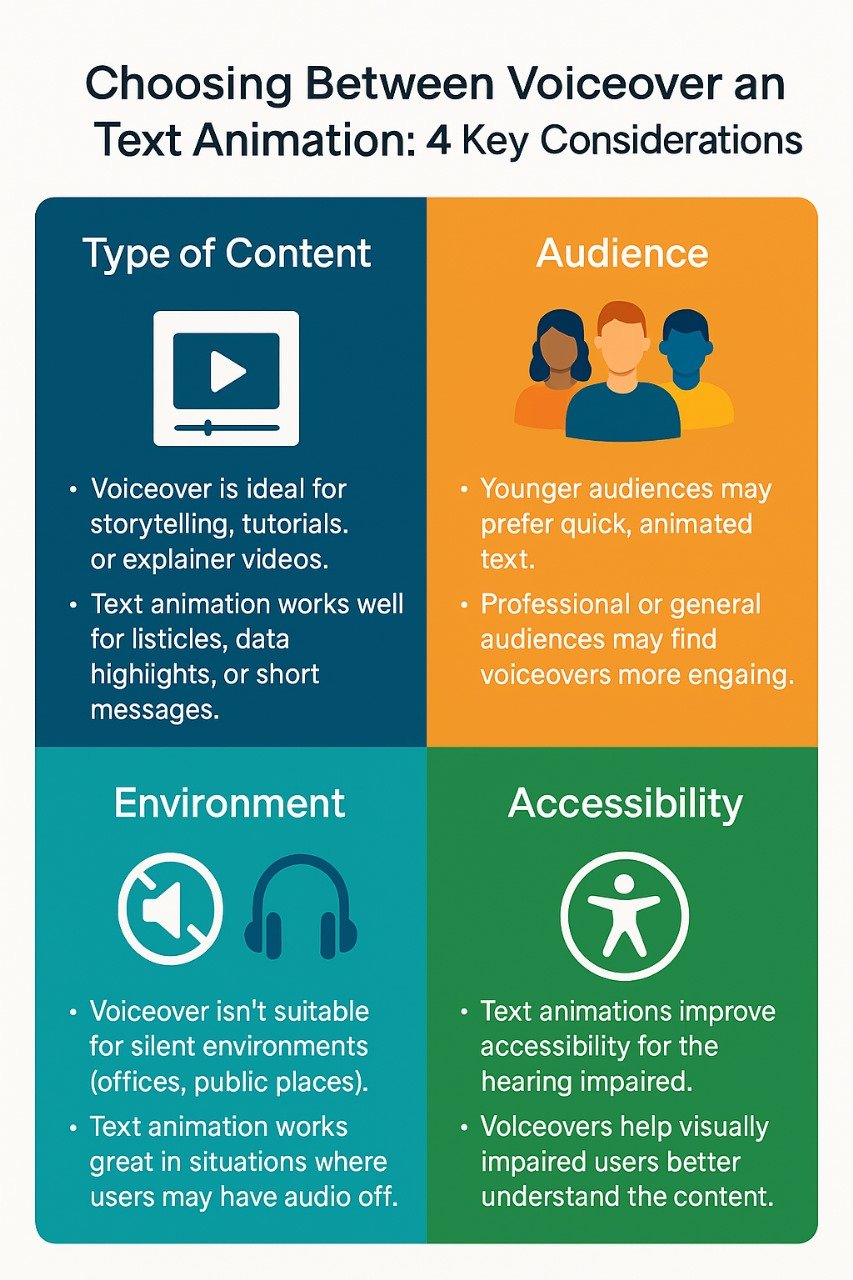
Key Considerations When Choosing Between Voiceover and Text Animation

When deciding whether to go with text animation, voiceover, or both, there are several important factors to keep in mind:

  1. Type of Content: If your content is simple, short, and visually driven, text animation might be all you need. However, if your message requires context, depth, or a personal connection, you’ll want to lean toward voiceover.

  2. Audience: Think about how your audience is consuming the content. If they’re on their phones scrolling through social media, text animation may be the way to go. If they’re watching at home or in a professional setting, a voiceover might be a better fit.

  3. Environment: Will your video be played in a noisy environment, like a trade show? If so, text animation will likely make a bigger impact than a voiceover.

  4. Accessibility: By combining both voiceover and text animation, you open up your content to a broader audience, including those with hearing impairments.

FAQs

1. Which is better for video content: text animation or voiceover?

It depends on the content and goals. Text animation works well for quick, visual messages, especially on mobile. Voiceovers are great for storytelling, explaining complex information, and creating emotional engagement. Often, a combination of both is the best approach to cater to different learning preferences.

2. How does adding a voiceover improve video engagement?

Voiceovers bring a personal touch, guiding viewers through the content with tone and pacing. They are especially effective for conveying emotions, making a deeper connection with the audience, and ensuring complex information is communicated.

3. Can I use both text animation and voiceover in the same video?

Using both text animation and voiceover can be highly effective. It allows you to reinforce your message visually and emotionally, catering to different audience preferences. This combination also makes your video more accessible, whether viewed with or without sound.

4. When should I use text animation instead of voiceover?

Text animation is ideal when you want your message to be understood without sound, especially for social media, mobile videos, or noisy environments. It works well for short, straightforward content or when visual clarity is key without the need for a detailed explanation.

Conclusion 

Deciding between text animation in your project versus a voiceover narration remains simple when you consider your content and audience needs. Your decisions rely on knowing your material while evaluating who views it together with the message you intend to deliver. The right video approach depends on your content needs which a professional video production company will help you determine between text animation or a voiceover narrative.

The essential requirement for success rests in having clear goals. To create a powerful visual impact you should consider using bold text. Your video content requires voiceover to present a detailed story to viewers. As a solution you should choose to integrate both approaches because this combination can help you achieve your desired results.

The message remains the essential element above everything else. Choosing text animation with voiceover or harmonising these elements produces the best results because they activate your message to reach audience members effectively.

Neque porro quisquam est, qui dolorem ipsum quia dolor sit consectetur, aliquam quaerats voluptatem. Ut enim ad minima veniam, exercitationem laboriosam, nisi ut aliquid ex ea autem velit esse quam nihil

address CPUTEK PRIVATE LIMITED
80, Vidyasagar Sarani
Purba Barisha Kolkata – 700008
call now 8013920772
Let's Talk