Easy ways to create product explainers using an online 3D animation maker

Introduction

Let’s be honest: sometimes, explaining a product is hard, especially when it has many features. Or when it is technical.

Nowadays, people lack of enough time to read long texts. That’s where 3D animation helps. It makes everything simple. Easy to see and easy to remember.

Making 3D animations a few years back was really expensive. It demanded special software, a professional designer, a big budget, and a lot of time. But now? You can make good product explainers from your browser, using an online 3D animation maker. No downloads are needed, nor any coding or anything else.

This guide will show exactly how easy making product explainer videos really are. You’ll learn the best tools to use, and what makes an explainer really work. It also explains what those mistakes are and how to avoid them. This guide helps a small business, marketer, or the person with a simple product be able to step forward with confidence.

Why Product Explainers Work So Well

Before talking about tools, let’s understand why 3D explainer videos work.

People can learn better with visuals: Most of us understand things when we visualise them. A rotating 3D model shows your product from every side. It highlights features that static photos can’t show.

They save time: Instead of reading three-stanza boring paragraphs, viewers enjoy a 30-second animation video clip. This way, they understand faster and remember the product longer.

They build trust: When you make a quality educational video, customers consider you as a professional. This way, they feel confident to buy your product..

They work everywhere: You can use a 3D animation for a product explainer on your website, on social media and other platforms. Here, one video brings many users.

product explainers work so well

What is an Online 3D Animation Maker?

An online 3d animation maker is a web tool that helps you create animated videos. No need to install heavy software. You don’t need to be a designer. You don’t need to have traditional technical knowledges.

These platforms give you templates, ready-made models, and drag-and-drop features. Everything is simple. You just choose what you need. Customise it and just export your video.

Some tools also offer 3d animation from video features. This means you upload normal video footage and turn it into animated content or add 3D elements to existing clips. It’s very useful when you want to mix real footage with animation.

Getting Started: What You Need Before Creating

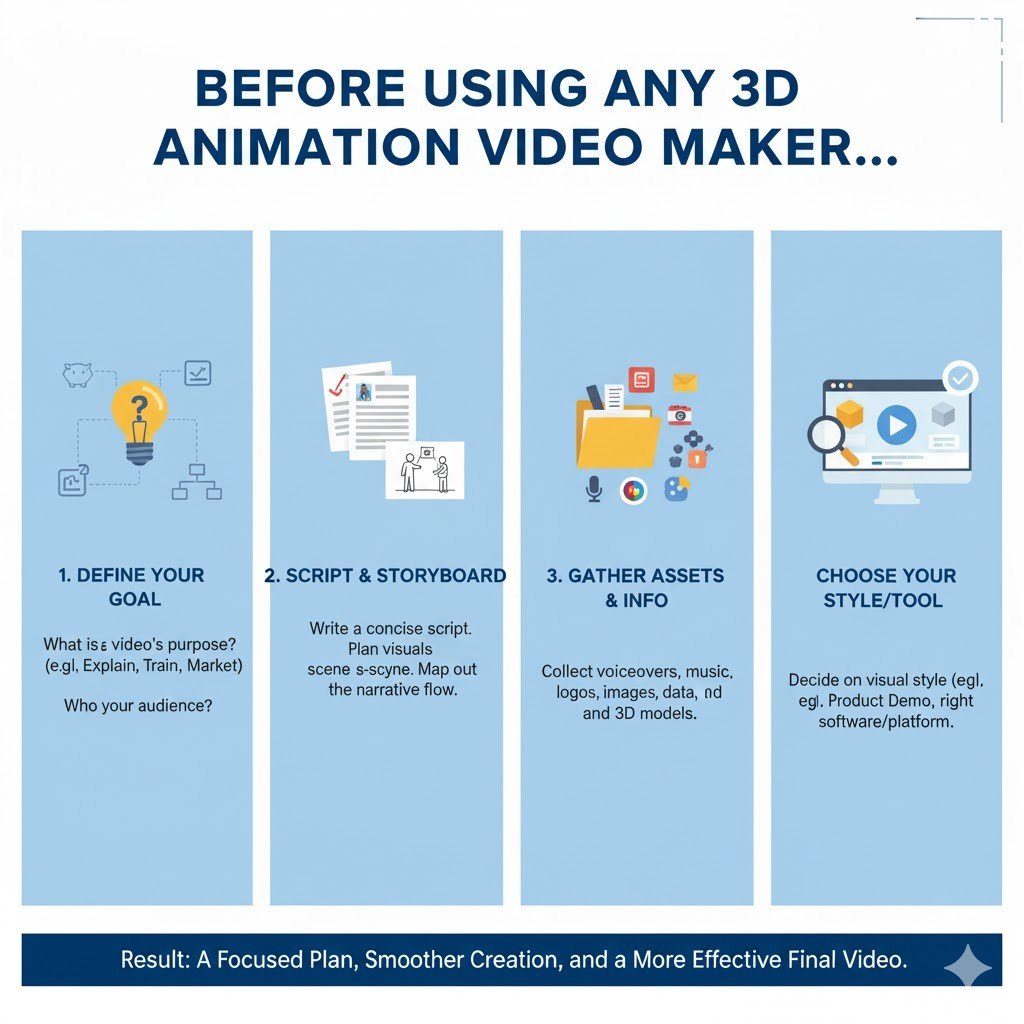
Before using any 3d animation video maker, a few things need to be prepared.

Know your message:  What do you want to explain? Don’t try showing everything. Focus on one main feature. Or one benefit. Keep it simple and deliver your message.

Write a short script: Even if your video has no voice, write down the steps you want to show. This helps your presentation stay organised.

Gather reference images: If you’re showing a real product, take photos from different views. This helps build your 3D model.

Think about your audience: Are they technical people? Or regular customers? This affects how detailed your animation should be. Professional content can be longer. Consumer videos should be quick and funny.

Before Using Any 3D Animation Video maker

Step-by-Step: Creating Your Product Explainer

Let’s look at the process. It’s easier than you think.

Step 1: Choose Your Platform

Not all 3d video maker tools are the same. Some are better for beginners. Some give more features for advanced users.

Look for platforms that offer:

Easy interface

Ready templates for product explainers

Library of 3D models and objects

Good export options (HD quality, different formats)

Fair pricing or free trial

Many tools also provide 3D animation character buildup options. This is useful if you want to add a person or mascot to your product. These characters make videos feel more personal.

Step 2: Select a Template or Start Fresh

Most platforms give templates. For product explainers, look for ones that show:

Product rotation or 360-degree view

Feature highlight animations

Step-by-step flows

Before/after comparisons

Templates save time. You just replace the sample product with yours. Change colours. Adjust text. Done.

If you want full control, start with a blank canvas. This takes longer but gives complete freedom to make the presentation from scratch.

Step 3: Build or Import Your 3D Model

Here’s where it gets interesting. You have a few options:

Use library models: Most platforms have thousands of ready-made objects to make the model. Search for something close to your product. Then customise colours and textures.

Upload an own model: If already have a 3D model (in .OBJ or .FBX format), you can upload it directly. The .OBJ or .FBX upload method works definitely. Especially if you’re working together with a designer, it is just a charm.

Create from scratch: Some platforms let you build simple shapes and combine them. Not as detailed as professional software, but good enough for basic explainers.

Step 4: Add Movement and Animation

This is where your model is alive. Movement makes a presentation interesting.

Common animation types for explainers:

-Rotation: Show your product spinning slowly.

-Zoom in: Focus on specific features.

-Assembly animation: Show how parts come together.

-Floating elements: Make features “pop out” with text labels.

-Transition effects: Smooth changes when showing multiple products.

Most tools let you set keyframes. You place the object in position A, then position B. The Software creates a smooth movement between them. It’s simple and very effective.

Step 5: Add Text, Labels, and Annotations

Your animation should explain itself without sound.

Let’s see how? Add text to:

Highlight key features

Show product names

Display prices or specs

Include your website

Keep text short, use clear fonts, and make sure colours stand out from the background. If your video plays on mobile, test that the text is readable on small screens too.

Step 6: Choose Background and Lighting

Background matters more in 3D animation. A clean, simple background keeps focus on your product.

For tech products, use neutral colours like white or grey. For lifestyle products, try soft gradients or minimalist scenes.

Lighting makes your 3D model look realistic. Most platforms have preset lighting. Choose one that shows your product clearly. Not too dark, not too bright.

Step 7: Add Music or Voice-Over (Optional)

Sound isn’t always necessary. But it can make the video more professional.

For background music, choose something calm and modern. Nothing too loud. Many platforms offer free music libraries.

If you want voice-over explaining features, record it separately. Then upload and match with the animation. Make sure the voice matches what’s happening on screen.

For social media, remember that many people just scroll and will watch it sound. So even if you add audio, make sure the video works silently with text and clear visuals.

Common Mistakes to Avoid

Good or bad, the simple tools may be used, but mistakes will still occur. Check these out:

Too much information at once: Try not to show ten features in a 30-second video. Stick to the most important ones. If necessary, make multiple short videos.

Poor pacing: Slow or too fast, and the people viewing get bored or have a headache. Pick a few speeds and find the one that works well as judged by positive feedback.

Don’t consider the mobile viewers: Nowadays, most people view videos via their phones. The text should be so concise that it stands out from the background.

Forgetting to provide a call-to-action: At the end: tell people what to do next, or visit the website, click the link, buy no; make sure to always guide them!

Too many effects: Just because you can create and add sparkles doesn’t mean you should. Be clean and professional.

Real-World Uses for 3D Product Explainers

These videos aren’t just for top animation companies. Anyone can benefit from these video-making strategies.

E-commerce stores use them on product pages. When customers see how something works, they buy more.

Startups use them in pitch presentations. Instead of explaining verbally, they show a quick 3D animation. Much more impressive.

Manufacturers use them in trade shows. Playing a loop of educational video on screens attracts visitors.

SaaS companies use them to explain software features. Even though software isn’t physical, 3D animations make concepts clearer.

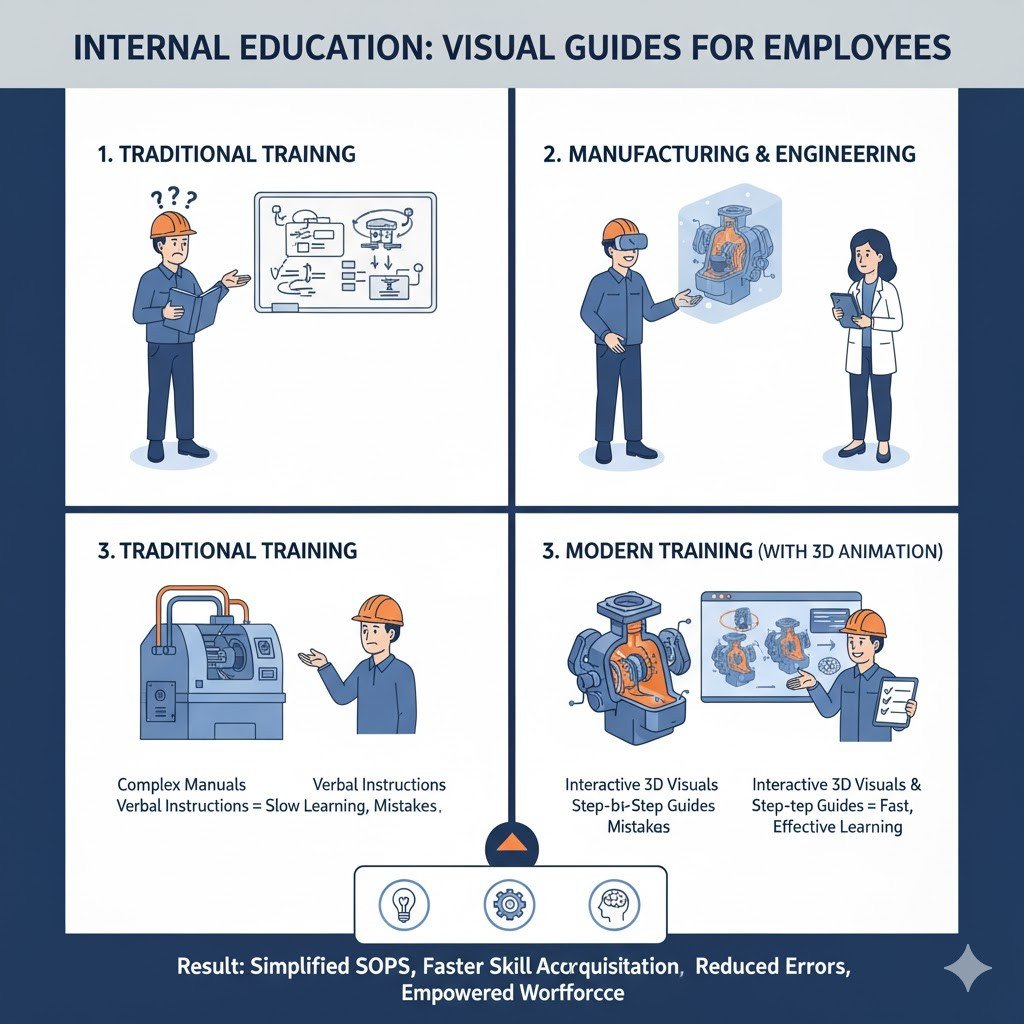
Training departments use them for internal education. Teaching employees becomes easier with visual guides.

Internal education

Tips for Making Your Explainer Stand Out

Want your video to be better than average? Here are some additional tips:

Tell a story:  Even a simple product has a story. Show the problem first. Then show how your product solves it. This makes your video more impactful.

Use consistent branding: Match your brand colours, include logo, use fonts from your website. This makes the video feel professional.

Keep it short: For social media, aim for 15-30 second shorts. But for a website, such shorts can extend to 60 or 90 seconds, whichever they prefer. Anything longer is considered a loss of attention in today’s world.

Check the Feedback: Before posting, show the video to someone who doesn’t know your product. Do they understand it? That’s the real test.

Update regularly: If your product changes, update your explainer. Old videos with wrong information damage your marketing process.

The Future Is Getting Easier

Technology keeps improving. What was difficult one year back has become easier today.

Some new 3d video maker platforms are adding AI features. You describe your product in text. AI generates basic 3D animation for you. You just fine-tune it. This makes the process even faster.

Other tools are improving 3d animation from video technology. You film your product with your phone. Software converts it to 3D automatically. Then you animate it however you want.

As these tools get better and cheaper, there’s no absolute problem in using 3D explainers. They’re becoming standard in modern marketing.

FAQs

Do I have to have design skill for an online 3D animation maker? 

A: No, not at all. The modern apps come with pre-made templates, drag-and-drop features, and ready-to-use elements. They are totally useful for non-design audience If you can use any basic software such as PowerPoint, you can definitely create 3D animations.

How long does it take to create a simple product explainer?

A: It takes about 2-4 hours for a basic 30-second template-based production. These hours include choosing a template, customizing the model, entering text, and tweaking the timing. The more you practice, the faster you will finish similar projects–perhaps in an hour or less.

Can I use these videos for commercial purposes?

A: Most platforms allow commercial usage, but you still need to read licensing terms. Some free plans are restricted. Paid plans generally grant full commercial rights to your content. Just be sure to read the licensing for any music or stock elements you use.

Conclusion

Product explainers do not require an art degree anymore. By very easily creating a professional-level animated video on the net in an hour with a 3D animation maker, everybody can.

The designing is so simple. Just choose a platform, build or import a model, apply some movement and add some text, and then export. Now your explainer is ready for use anywhere and everywhere.

These videos help your customers to understand more quickly what your product is all about. They instill a sense of trust in your product. They convert. The most importantly, whether you are selling a physical product, trying to explain a service, or teaching a concept, 3D animation makes what you are communicating more clear and much more engaging.

So stop waiting for a better moment. Pick a tool. Play with it and make your first imperfectly perfect explainer. And from that, you will get much better and faster with every video.

Growing your brand using social media branding animation strategies

Introduction

If you wish to build a brand today, you need a clear identity that your target audience can easily recognise. On social media networks, people are inundated with numerous still images and very rapidly disappearing posts; therefore, the use of animation creates a much more eye-catching medium. Animated video advertising allows a brand to draw more attention, communicate ideas simply and emotionally connect with consumers.

social media marketing videos shape how audiences see a brand. Creating a properly designed animated story will give a brand a modern and approachable identity. Whether it’s a fun Instagram post or a LinkedIn product teaser, using animation creates a visual voice that traditional static posts cannot offer.

In this article, we will cover the various uses of animated videos to assist with branding efforts. Specifically, we will cover how animated videos can support growth in followers, enhance engagement from consumers, and aide in accurately representing your brand’s voice. Finally, at the conclusion of this article, you will receive valuable resources for creating branded animated videos that can be easily amplified across social networks and understand the benefits of utilising animations for your digital 

Why Use Animated Videos for Branding on Social Media?

Animation is not only eye-catching — it is also a smart idea for social media marketing.

Nowadays, many modern brands use animated content to grow faster on social media.

1.Increased Engagement: Animated pictures and motion make people stop scrolling.  Posts featuring motion outperform static graphics on nearly every platform, making animation an essential part of any branding social media plan.

2.Memorable Storytelling: A brand video can communicate complex ideas quickly through colour, character, and motion. People remember stories told through animation far longer than plain visuals.

3.Emotional Connection: The ability of animated brand characters to emulate different personality traits (humor, etc.) is one way to exhibit a personality that static media formats (live action video) are unable to create.

4.Shareability and Virality: Animated short videos also happen to be the most shared type of social media content as they create an opportunity for brands to provide entertainment to their target market while simultaneously delivering a marketing message.

5.Consistency: Utilizing the same art style, character design, and/or color palette as a branding element, helps to continue branding consistency throughout multiple campaigns that feature Animated Social Media Videos, therefore unifying your Brand Message.

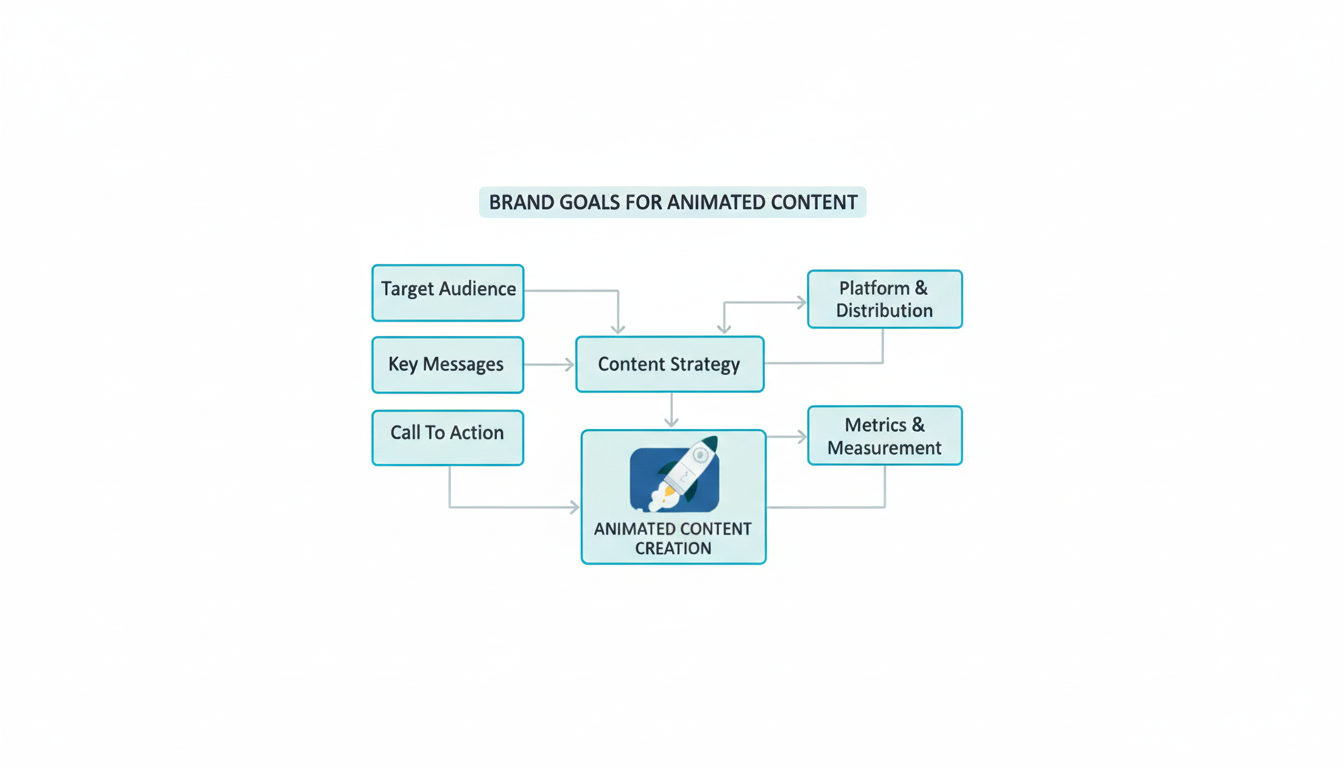
Step 1:Determine Your Brand Objectives Before Creating Any Animated Content

Before making an animation, first think about your brand’s goal.

Do you want more followers, show your product value, or make the audience remember your story? When the goal is clear, the animation idea becomes stronger.

Many brands just make videos for posting, but they forget to connect them with business goals. Real branding social media strategy starts from purpose, not just visuals.

Animated content creation

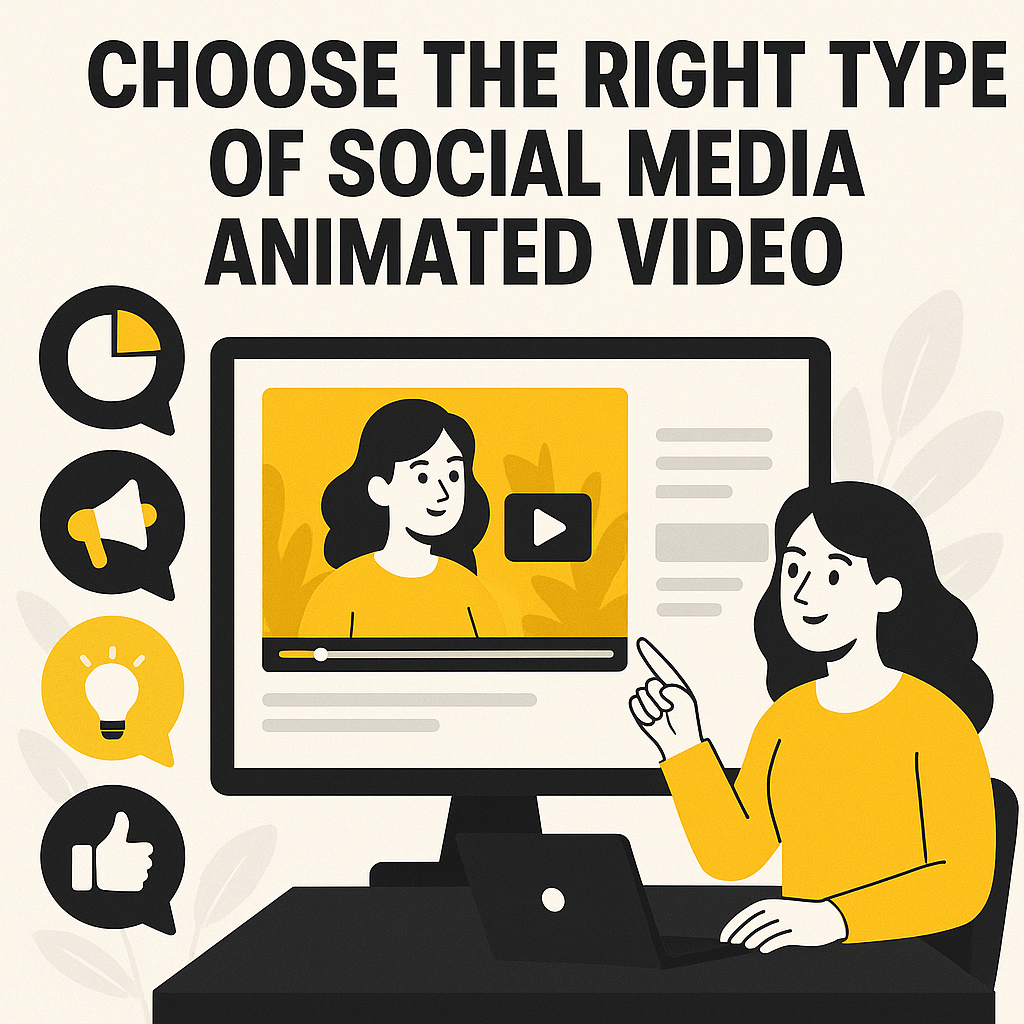
Step 2: Choose the Right Type of Social Media Animated Video

There are many animation styles, but not every style matches every brand. You can create:

1.Explainer videos – good for promoting a product.

2.Short promotional clips – perfect for quick viral content

3.Motion graphics – good for professional tone, like LinkedIn

4.Story-based videos – to show emotions and brand values

When making Social Media Animated Videos, always think about which platform you use for posting. Instagram needs short, colourful, and fast clips. YouTube or LinkedIn can use longer storytelling videos.

A good animated video for social media doesn’t need a big budget. It just needs to be simple, clear, easy to understand and shareable.

Social media animated video

Step 3: Craft Storytelling That Reflects Your Brand Voice

Animation without a story is useless. You need to write your video script more conversationally by using simple, emotional words.

Sometimes you need to use humour and light animation, sometimes you can use smoother motion and shooting colours for branding. The goal is to make people feel your brand’s goal through visuals and voice.

Every brand video should tell a small story — this storytelling style makes your branding social media content more catchy and relevant.

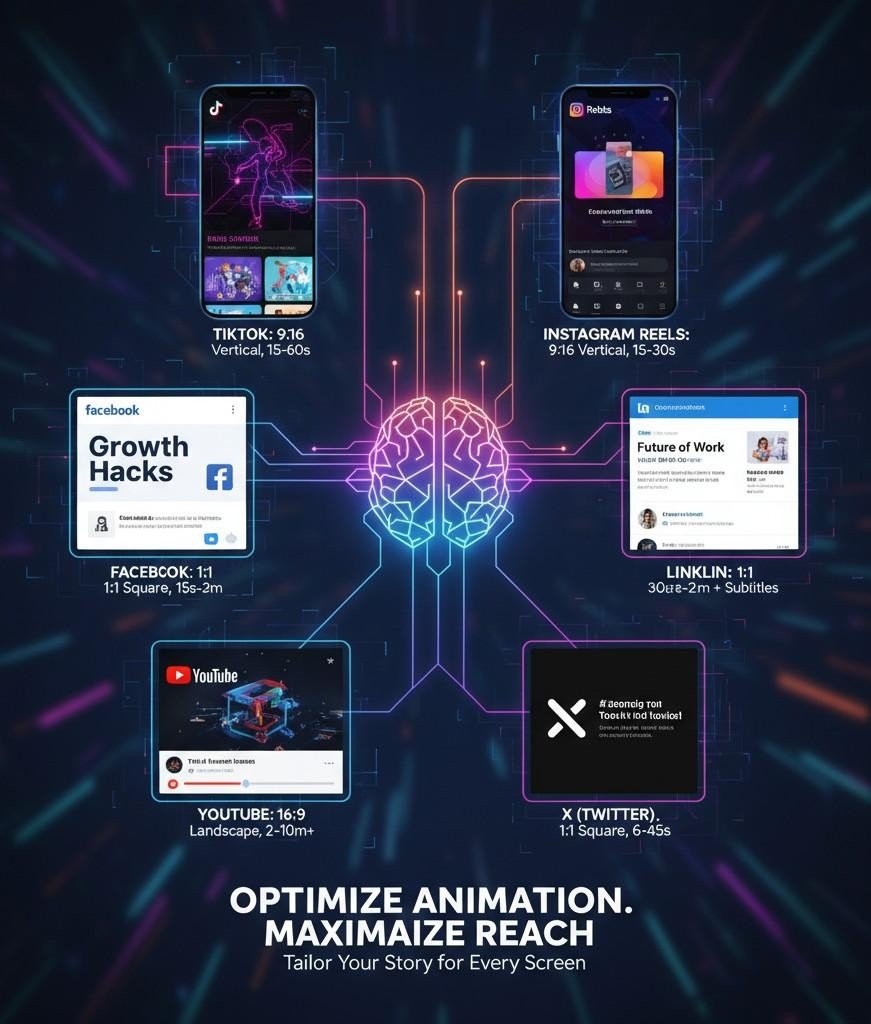
Step 4: Optimise Animation for Each Social Media Platform

Each social media platform has its own algorithm. What works better on YouTube may not perform well on Instagram.
Here are simple key points to consider before optimising the video:

1.Instagram / YT shorts: short clips, approx. 30 seconds that catch attention fast.

2.LinkedIn: professional social media marketing videos showing product or service value.

3.Facebook: emotional stories and customer journeys.

4.YouTube: longer explainers or a series of branded storytelling.

You need to change the size, subtitles, and length based on platform rules. Try to add your logo or tagline always at the end, so viewers connect the animation with your brand name.

Each Social Media Platform

Step 5: Collaborate with the Right Animation Team

Good animation is teamwork. It’s possible that you have an awesome idea, but it won’t work if you don’t have great designers, voice-over talent, and editors who understand what your brand stands for. 

When selecting an agency or freelancer, provide them with your company’s brand guidelines, such as colors, fonts, logos, and voice. Be sure to make feedback as direct and uncomplicated as possible. The goal is to create one strong Social Media Animated Video rather than several average ones. 

Brands create a style guide for future animations, so create videos that look consistent. This small step helps your branding social media content stay professional and trustworthy.

collaborate with animation teamUse Cases Where Social Media Animation Works Best

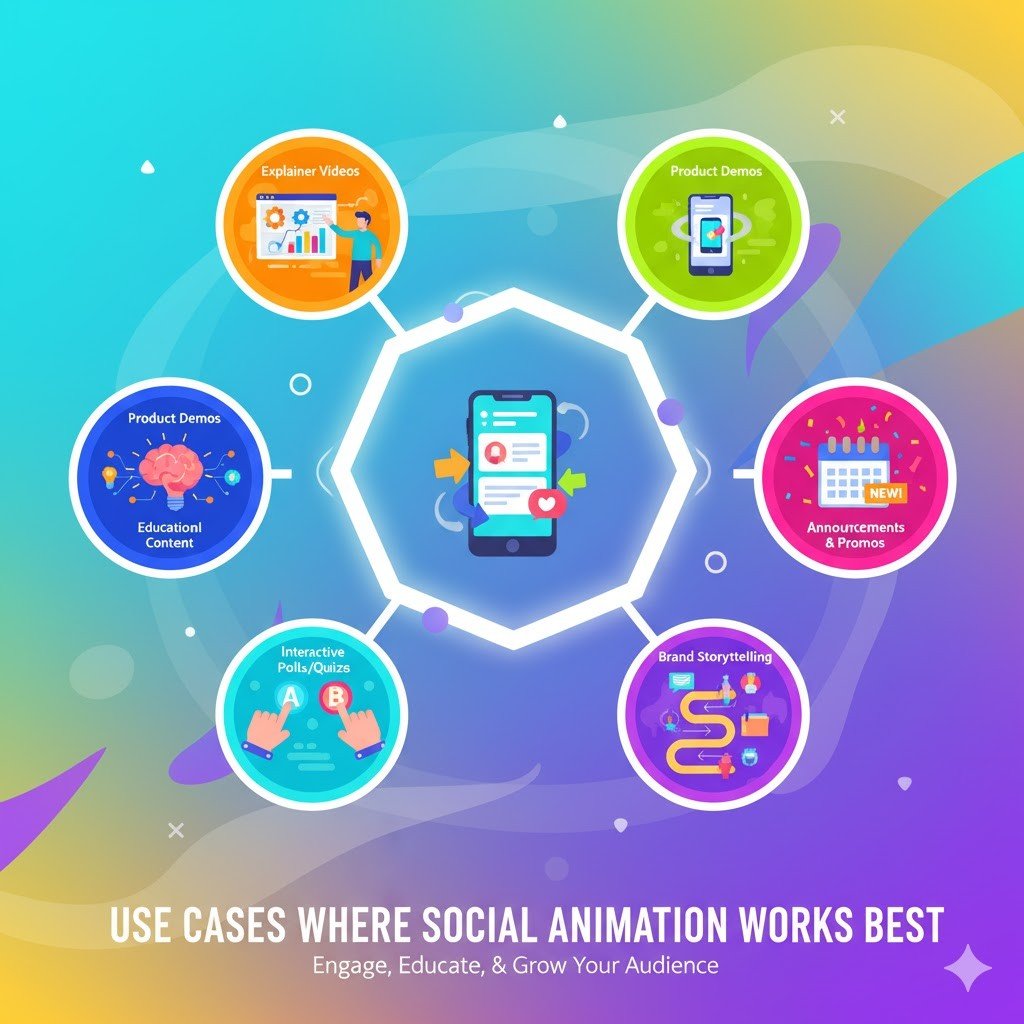
Animation is not only for big brands. Even a small company can use it in many creative ways.
Animated videos on social media are great for growing your brand online.

1.Product launches and announcements: When you release something new, animation can quickly show what it does and why it matters. A short animated video looks more engaging than a regular image post and grabs attention fast.

2.Brand Awareness Campaigns: Small social media viral videos can make people talk about your brand fast. Fun motion, catchy text, and short storytelling can expand your reach.

3.Educational or Informational Content: If your brand wants to teach or explain something — maybe a service feature or process — animation makes it easy to understand and remember.

4.Event or Service Promotion: For special offers, sales, or social messages, animated videos help your post stand out from hundreds of other posts on the timeline.

5.Brand Refresh: When the logo or brand design changes, animation helps introduce the new look with emotion and movement.


social animation works best

Each of these examples supports you in making your branding social media strategy more attractive and easier to remember for your audience.

Mistakes to Avoid While Creating Social Media Animated Videos

Avoiding these mistakes helps your animation look more professional and keeps your branding social media content effective in every campaign. Even with a good idea, animation can fail if done wrong. Many brands make the same kind of mistakes. Try to stay away from these common ones:

1.Too Much Going On: When animation has too many effects or fast motion, it makes people confused. Keep it simple so the message will be clear.

2.Weak Story or Message: Every video must tell something meaningful. If your brand video has no story, people will scroll fast without watching.

3.Ignoring Platform Needs: A long video might be fine on YouTube, but not good for Instagram. Always change the social media video length and size for each.

4.No Brand Consistency: If you use different colours, voice, or tone each time, people get confused. Always follow your brand tone and design guide.

5.Forgetting the Call to Action: Tell viewers what to do next — visit, subscribe, or share. Without this, even the best social media marketing videos lose value.

How to Scale Your Brand’s Animation Strategy Across Channels

Once your Social Media Animated Videos begin to deliver outcomes it’s wise to expand the concept. Maintaining the animation style enables your marketing efforts to reach various platforms and markets providing a unified powerful social media presence.

When promoting in nations you can quickly modify the subtitles and voiceover to match the local languages allowing you to retain your animation without needing to produce a completely new version, for every country. This lowers expenses. Saves time while delivering a reliable and robust social media presence for your brand.

What to Expect: ROI and Measurable Impact

Animation is not only a creative work — it brings real results. ROI helps to measure the value gained from producing and distributing the animation video relative to its cost. By using Social media animation strategies, you can measure how your social media marketing videos perform well by checking:

1.Engagement rate: likes, comments, shares

2.Reach and views: how many people watch your animation?

3.Website traffic: how many viewers come from your video link

4.Sales or sign-ups: real action from your campaign

Brands that use animated content usually see more attention and better brand value. Sometimes, one short social media viral video can bring more visibility than a big paid advertisement. Also, when you use consistent brand videos, the audience starts trusting your brand faster. Over time, this trust turns into sales and loyalty.

So animation is not only a creative visual representation, it is a smart investment for future growth in your branding and social media strategy.

FAQs

1.What type of animation works best for brand videos?
It depends on your brand tone. For a fun or friendly style, 2D animation or motion graphics work very nicely. For a more formal or professional industry, simple motion design looks better.
Always try to make your Social Media Animated Video short in length and clear to make it more engaging..

2.How often should I post animated videos on social media?
Try to post at least one or two short animated clips per week. If you post regularly, viewers recognise your visual style and build trust in your brand video strategy.

3.Can small businesses use animation videos too?
Yes, of course. You don’t need a big budget to use this marketing medium. Any small brand can make nice social media marketing videos using simple online tools or by hiring a freelance creator.

4.How can I measure if my animation is successful?
Watch for engagement, shares, and message reach. If more people comment, share, or follow your page, it shows your animation is doing a good job.

Conclusion

Animation serves more than a decorative purpose. It plays a crucial role, in digital branding nowadays. By combining the narrative and straightforward design Social Media Animated Videos can accelerate the growth of any business online. They enhance your brand’s visibility, approachability and credibility.

When individuals repeatedly view your stories they are more likely to retain your brand name and message. Begin producing a sequence of animated videos to make your brand more distinctive. Your intended audience will start developing an emotional bond with your brand, which you can keep enhancing through these videos.

Creating Interactive Product Demos Using 3D Video Techniques

Introduction

Showing how a product works should be simple. But too often, we rely on flat videos or static slides that just scratch the surface. 

They tell people what a product does, but not how it feels to use it. And that’s a problem, because today’s users want more than just information. 

They want to experience the product before making a decision. This is where 3D video techniques are making a real difference. 

These demos let people interact with your product – rotate it, explore its features, and see it from every angle. It’s the closest thing to trying it in real life. From gadgets and devices to apps and platforms, businesses are now using 3D demos to simplify explanations and spark curiosity. 

Whether it’s on a website, during a pitch, or inside an app, these videos help people truly get what you’re offering, quickly and clearly. Let’s walk through how it works and how your business can use it too.

What Are Interactive 3D Product Demos?

An interactive product demo built with 3D video techniques is more than a visual walkthrough. It gives users control to explore features, navigate views, and get a close look at every angle of a product. Think of a virtual showroom that responds to your audience’s curiosity.

These demos usually include:

  • Digital twins or 3D models that reflect the real product

  • Walkthroughs that highlight functionality through 3D animation video

  • Hotspots for information overlays

  • Interactive options like toggles, color selections, or feature configurations

  • AR or VR views for immersive interaction

This format isn’t limited to physical products. Service providers in the banking industry use interactive walkthroughs to help users explore how digital wallets, dashboards, or platforms work.

Why Interactive 3D Product Demos Matter

Every demo is a sales conversation, without involving humans. This means the visuals must speak directly to the user’s intent.

Current-day users don’t just want to “see” the product, they want to understand how it works, how it solves a problem, and what sets it apart. That’s where 3D animation video becomes a functional communication bridge in modern product marketing.

These demos reduce sales pressure by allowing users to interact, explore, and evaluate at their own pace. Whether you’re introducing a SaaS dashboard or a mechanical tool, 3D walkthroughs offer something static pages or 2D animations don’t: depth and choice.

What Makes a 3D Product Demo Interactive

  • The user can control the view — rotate, zoom, or enter different angles.
  • Specific elements respond to actions — click, tap, or hover.
  • The journey isn’t linear — users explore based on interest.

Combine this with stylized storytelling – lighting, angles, user control, hover states, and your audience is now engaging with your video. This approach often resembles what we see in VFX-driven 3D animated product ads – stories that mix technical clarity with style and surprise.

Why Businesses Are Using 3D Interactive Demos

Engaging Attention Where It Matters

Static content asks the viewer to follow. Interactive demos let them lead. This active involvement improves focus and makes it easier for viewers to absorb what they’re seeing.

The banking industry uses this strategy well. Instead of explaining investment products through PDFs, institutions use animated videos that allow customers to select risk levels and explore portfolio behaviors.

Helping Viewers Understand Faster

With 3D visuals, technical features are broken down into digestible movements, angles, and highlights. Whether it’s how a sound system manages frequencies or how a loan calculator behaves, interaction gives clarity.

In the banking industry, for example, customers often feel confused navigating new platforms. A video 3D animation demo that guides them step-by-step makes their learning curve smoother.

Shortening Decision Time

With interactive demos, users don’t need sales calls or long FAQs to decide. They try, explore, and get answers right inside the video. This approach has helped reduce sales cycles by several days across industries.

Make an Interactive 3D Product Demo

Brands that want to make animated videos that convert need to think beyond storytelling. It’s not just about showing what the product does – it’s about letting the user feel it firsthand. This approach turns passive viewers into active participants.

When you work with a team offering professional animation video production services, they won’t just create an animation. They’ll design a decision journey, one that improves product understanding, drives action, and supports long-term recall.

Whether you’re in SaaS, manufacturing, or the banking industry, interactive 3D demos are one of the clearest ways to demonstrate complexity without overwhelming the user.

Key Techniques Used by a Video Production Agency

A skilled video production agency uses the following tools and logic to build interactivity:

1. 3D Modeling & Texturing

Creating a realistic product replica in 3D using Blender, Cinema 4D, or Autodesk Maya. Materials are layered with texture maps to mimic real-world finishes like plastic, glass, metal, or rubber.

2. Animation Logic

Motion sequences are mapped to simulate user actions or device behavior – e.g., a screen lighting up when a switch is flipped or airflow being demonstrated inside a machine.

3. Interaction Triggers

Custom code (usually in JavaScript or Unity) enables viewer-driven motion. A user hovers or clicks, and a predefined event occurs – a breakdown of components, a voiceover starting, or a part animating.

4. Narrative Flow & Voiceover

Even in interactive demos, a storyline helps. A script paired with voiceover ensures users understand key features without feeling overwhelmed by options.

Where 3D Videos Are Working Well

Healthcare

Medical equipment brands use 3D video walkthroughs to train buyers or doctors on device usage and setup.

Automotive

Vehicle brands use video 3D animation to let users explore interiors, switch dashboard themes, run a simulated test drive or showcasing product demo.

Hestur Werewolf Scooter 3D Launch Video


Software & Banking Tools

Platforms offering digital tools often use interactive 3D product demos to reduce onboarding friction. It’s easier to explain investment workflows, dashboard navigation, or feature usage with visuals over text.

In these cases, consider 3D explainer videos as a good investment for your brand. Instead of bombarding prospects with long pitch decks or endless onboarding screens, animated demos walk them through each core module with a blend of narrative and interaction.

Drawing Inspiration From Top Video Ads

Some of the most impactful product videos include advanced VFX or cinematic sequences that leave a visual imprint. Even if your project doesn’t require full visual effects, studying these ads shows how motion, pacing, and voice can add clarity.

Measuring Success Beyond Views

Good demos don’t just look sharp, they guide decisions. Track user actions such as where they click, how long they engage, what they skip.

If most users exit before interacting with the second hotspot, your structure might need adjusting. When a user watches until the end and fills out a form, you know your story holds their attention.

FAQs

1. How to create a 3D video of a product?

Start by defining your goal and collecting product references. Then model the product in 3D software, add textures and lighting, animate key movements, and render the video. A video production agency can help polish and deliver the final output with professional voiceover, effects, and background score.

2. How to make a product video demo?

Begin by scripting the key features and user journey. Next, create visual assets, either live-action footage or 3D renders. Add voiceover, callouts, and transitions to keep viewers engaged. If you’re planning an interactive demo, integrate clickable elements or hotspots. Partnering with experts who make animated videos helps ensure visual clarity and usability.

3. What is a 3D product animation video?

A 3D product animation video is a visual demonstration that shows how a product looks and works using digital 3D models. It simulates movement, assembly, or usage without filming the real object. These videos are widely used in e-commerce, tech, and the banking industry for interactive demos, pitches, and explainer content.

5. How are 3D videos created?

3D videos are created through a structured process: concept development, 3D modeling, texturing, lighting, animation, and rendering. Motion paths are assigned to simulate product functionality or experience. These are often produced by a video production agency with expertise in video 3D animation and specialized software like Blender, Maya, or Cinema 4D.

Conclusion 

Whether you work in electronics, healthcare, or the banking industry, interactive demos using 3D animation video help bridge the gap between product complexity and user clarity. The combination of smart storytelling, animation, and user-driven exploration makes these demos worth the investment.

If you’re planning to make animated videos that not only look good but also help viewers take action, then collaborating with an experienced video production agency makes all the difference.

Branding Essentials: Why Social Media Needs Short 2D Character Explainer Videos

Social media moves fast. People scroll quickly, attention spans are short, and businesses only get a few seconds to make an impression. In this fast-paced environment, using short 2D Character Explainer Videos is no longer optional – it’s essential. Animated videos are no longer just a creative trend. They are one of the most effective ways for brands to connect, explain, and engage. Especially in short formats like reels, stories, and feed posts, 2D animation delivers your message quickly while keeping your audience interested. But why are 2D Character Explainer Videos the perfect fit for social media? The answer is simple – characters help people relate to your message. A well-designed 2D character adds personality to your brand. Whether you’re explaining a service, showcasing a product, or sharing a brand story, character-based videos make your message feel human and approachable. Unlike traditional text or static images, animated characters can express emotions, tell stories, and simplify complex ideas visually. This makes them ideal for busy social media audiences. Short, animated content has a better chance of being watched till the end, remembered, and shared.

Another advantage of 2D animation is brand consistency. With character design, you can incorporate your brand colors, style, and voice, ensuring that your content feels unique and professional. Whether it’s an explainer, a quick tutorial, or a product demo, using 2D characters creates a visual identity that people remember. Of course, length matters. Social media videos work best when they’re short and direct. Keeping your Explainer Videos under 30 seconds allows your audience to understand your message without losing interest. A short video with one clear message works far better than longer, complicated content.

Working with a professional animation agency can help you get this balance right. Agencies understand how to design characters that align with your brand and simplify your message effectively. From scriptwriting to animation, professionals ensure your video doesn’t just look good – it works. 

Conclusion

Today, most leading brands rely on 2D Character Explainer Videos for product launches, social campaigns, and customer engagement. Whether you’re a small business or a growing enterprise, using character-led animated content can help your brand stand out in the social feed.

In the infographic below, we’ve highlighted the key branding benefits of using short 2D animated videos for social media. From audience engagement to brand recall, you’ll discover why this format works – and how it can help your brand build stronger connections. Take a look and see how short, character-driven videos can make a long-term difference to your brand. With the right creative partner and strategy, animated videos can turn your message into something memorable. It’s time to make 2D animation part of your brand’s social media success.

Social media moves fast. People scroll quickly, attention spans are short, and businesses only get a few seconds to make an impression. In this fast-paced environment, using short 2D Character Explainer Videos is no longer optional – it’s essential. Animated videos are no longer just a creative trend. They are one of the most effective ways for brands to connect, explain, and engage. Especially in short formats like reels, stories, and feed posts, 2D animation delivers your message quickly while keeping your audience interested. But why are 2D Character Explainer Videos the perfect fit for social media? The answer is simple – characters help people relate to your message. A well-designed 2D character adds personality to your brand. Whether you’re explaining a service, showcasing a product, or sharing a brand story, character-based videos make your message feel human and approachable. Unlike traditional text or static images, animated characters can express emotions, tell stories, and simplify complex ideas visually. This makes them ideal for busy social media audiences. Short, animated content has a better chance of being watched till the end, remembered, and shared. Another advantage of 2D animation is brand consistency. With character design, you can incorporate your brand colors, style, and voice, ensuring that your content feels unique and professional. Whether it’s an explainer, a quick tutorial, or a product demo, using 2D characters creates a visual identity that people remember. Of course, length matters. Social media videos work best when they’re short and direct. Keeping your Explainer Videos under 30 seconds allows your audience to understand your message without losing interest. A short video with one clear message works far better than longer, complicated content.
Working with a professional animation agency can help you get this balance right. Agencies understand how to design characters that align with your brand and simplify your message effectively. From scriptwriting to animation, professionals ensure your video doesn’t just look good – it works. 
Conclusion
Today, most leading brands rely on 2D Character Explainer Videos for product launches, social campaigns, and customer engagement. Whether you’re a small business or a growing enterprise, using character-led animated content can help your brand stand out in the social feed. In the infographic below, we’ve highlighted the key branding benefits of using short 2D animated videos for social media. From audience engagement to brand recall, you’ll discover why this format works – and how it can help your brand build stronger connections. Take a look and see how short, character-driven videos can make a long-term difference to your brand. With the right creative partner and strategy, animated videos can turn your message into something memorable. It’s time to make 2D animation part of your brand’s social media success.

How 3D Video Accelerates Product Demos: Steps from Modeling to Customer Engagement

Ever tried understanding a product online and felt unsure even after scrolling through every image and reading every detail? You’re not alone. Static visuals often leave too many questions unanswered – how big is it really? How does it move? Will it actually fit into my setup?

That’s exactly why more brands now rely on 3D video. It shows your product in motion, from every angle, in a way that feels real. When done right, it doesn’t just look good, it builds confidence. 

Whether you’re planning your first product demo or looking to make animated videos that speak clearly, this approach can help your audience decide faster and better.

Why Product Demos Deserve 3D Animation

Flat images and spec sheets don’t show how something feels. A 3D animation video brings a product to life, its textures, its scale, how it moves or fits in a real context. These visuals shorten decision cycles and build trust faster.

It’s not just about visuals, though. A smartly done 3D video animation improves product understanding, especially in B2B, industrial tools, furniture, or home appliances, where size, fit, and usability are often hard to convey.

One Video, Many Uses!

When businesses make animated videos, they usually think of ads or websites. But a great animation video production service will help repurpose that content across:

  • Online ads

  • eCommerce listings

  • Email marketing

  • Sales decks

  • Trade shows

That’s five different touchpoints covered by a single 3D video – saving time and cost across departments.

Don’t Wait for a Prototype

Need to launch a campaign while your product is still in production? No problem. A reliable video production agency can model it virtually and deliver a sleek demo that looks real enough to sell.

This is especially useful for startups, or for product upgrades that need pre-launch buzz.

Customers Want to Explore

Buyers today don’t want to be told, they want to explore. 3D animation videos help them do just that. They can zoom in, check how parts move, or view the product in context.

It’s like test-driving with your eyes. That leads to faster, more confident decisions.

The visual below shows a simple process – from modeling to interaction, and how each stage plays a part in improving engagement. If you’re planning to work with a video production service or build a scalable video library, this will give you a practical overview.

How 3D Video Accelerates Product Demos: Steps from Modeling to Customer Engagement

Conclusion 

3D video isn’t just a fancier version of live-action. It’s a smarter way to explain, sell, and support your product, especially when detail matters. A strong video production agency will help you build content that doesn’t just look good, but also works across sales and support teams.

Ready to make your product demo more than a slideshow? Start with 3D video animation that tells your story right.

The Global Cost Advantage: Online 3D Animation Maker vs. Traditional Studio Production

3D animation has become a powerful tool for marketing, product demos, training, and visual storytelling. However, when it comes to creating 3D animated videos, businesses often face a key decision: Should you use an online Animation Maker, or work with a traditional studio?

At first glance, both options seem to promise professional results. But cost, customization, timelines, and output quality can differ greatly. Understanding these differences will help businesses choose the right approach based on project needs and budget.

Online Animation Maker platforms have changed the game. With ready-made templates and simple interfaces, they allow users to create 3D videos quickly and at a fraction of traditional costs. Projects that once required large budgets can now be produced with minimal investment. Many of these platforms follow a pay-per-use or subscription pricing model, making them especially useful for startups and small businesses looking to create content on a tight budget.

However, this affordability comes with limitations. Most online tools offer limited customization, relying heavily on pre-designed assets and basic animations. This means your video might look similar to others using the same platform. For brands that want full control over their visual identity or need realistic, product-specific animations, the limitations of an Animation Maker can become a problem.

This is where a traditional animation studio or animation agency still holds its value. Working with professionals allows for fully custom 3D modeling, realistic texturing, advanced rendering, and creative storytelling — all tailored to your brand. While this approach involves a higher upfront cost and longer production timelines, the result is a high-quality video that feels unique and professional.

When it comes to delivery speed, online tools easily win. While a studio project may take several weeks to complete, an online maker can produce a basic 3D video in just a few days. This makes it a smart choice for fast campaigns and social media content where speed matters more than depth. 

Conclusion

Choosing between an Animation Maker and a traditional studio isn’t just a question of budget — it’s about project goals. If you need quick, low-cost 3D content for simple promotions, online tools can get the job done. But for product launches, investor presentations, or brand films, working with a studio ensures professional results that align with your business image.

The infographic below highlights the global cost advantage of using online makers versus studio services.

The Global Cost Advantage: Online 3D Animation Maker vs. Traditional Studio Production

As businesses around the world invest more in visual content, understanding your options can save both time and money. Whether you choose a fast online solution or opt for the expertise of a professional team, knowing the differences between these production models will help you make smarter decisions for your next 3D animation project.

The Smart Buyer’s Guide to Animated Video Production

Animated videos are everywhere today. Businesses use them to explain products, sell services, and train teams. Why? Because animated content grabs attention, simplifies complex ideas, and works across websites, social media, and presentations.

But creating a professional video isn’t just about using the right software or adding flashy effects. It’s about understanding the process and choosing the right style for your message. That’s where knowing the basics of Animated Video Production can help.

If you’re planning to get an animated video made, this guide is for you. Whether you’re a startup founder, marketing head, or training manager, knowing what goes into a good video will help you make the right decisions.

Why Use Animated Videos?

Animated videos do what static images and text can’t. They explain faster, hold attention longer, and help people remember your message. Studies show that people are 4 times more likely to understand a topic when it’s shown visually. Videos also get double the engagement on social media compared to other content formats. In short, animation doesn’t just tell your story — it shows it.

Choosing the Right Style

There’s no one-size-fits-all approach. Do you need a simple explainer? A 2D animation might be perfect. Want a more realistic product demo? Go for 3D animation. Need sleek, professional visuals? Motion graphics could be the answer.

Some brands also choose hybrid styles that mix different techniques to get the best results. Knowing these options helps you ask the right questions when speaking to an agency or vendor.

The Production Process

Making an animated video is a step-by-step process. It starts with a clear goal and script. Then comes storyboarding, designing the visuals, adding motion, voiceover, and sound effects. Each step builds on the previous one to create a final video that meets your goals. Understanding this basic flow will help you work better with your video partner and avoid delays or surprises.

What Affects the Cost?

How much you’ll pay depends on several factors:

  • Type of animation
  • Video length
  • Voiceover style
  • Number of revisions
  • How fast you need it

3D videos usually cost more. So do projects with short deadlines. Knowing these cost drivers helps you plan your budget better.

Should You DIY or Hire a Studio?

DIY tools exist, but they often lead to generic results. If you want a custom, brand-specific video, working with an animated video production company makes sense. You get professional storytelling, better quality, and a smoother process.

Animated videos are one of the best ways to explain, sell, and train today. But making the right choices at the start matters.

Scroll through our infographic to understand your options, the steps involved, and how to get the best video for your business.

The Smart Buyer’s Guide to Animated Video Production

The Smart Buyer’s Guide to Animated Video Production

Let’s help you make your next Animated Video Production simple and successful.

How Animated Character Videos Simplify App Feature Explanations

Introduction: The App User Experience Challenge

Most apps today offer many features. But users don’t have time to explore everything on their own. They need quick, clear guidance to understand how your app works. Text manuals, long FAQ pages, or static images no longer help. These methods confuse more than they clarify. This is where animated character videos make a real difference.

Instead of explaining features through text, you show them in action. Users watch a friendly character perform each step. The visuals make tasks easy to follow. The character becomes the guide. Across SaaS platforms, fintech services, and edtech apps, more companies now choose animated videos for onboarding. They use them inside apps, on the Play Store, or in help sections. These videos help people understand the app quickly and without frustration. In short, animated character videos act like a personal assistant for your users, one that works 24/7.

Why Animated Character Videos Work for Feature Explainers

People remember stories better than facts. That’s not just opinion; it’s backed by Mayer’s Cognitive Theory of Multimedia Learning. When you explain a process using story-driven visuals and narration, people learn faster and retain more.

Now think about your app’s features. They might be technical. They might feel complicated. But if you use animated character videos, you can explain every feature as a simple, human action.

Characters help in two big ways:

  • They humanize your instructions. Instead of showing a menu or button alone, a character shows what action to take. Users relate to the character and follow easily.
  • They simplify complex flows. Features like payment cycles or dashboard settings become clear when shown step by step with animations.

Your video also speaks in your brand’s tone. A friendly, professional, or energetic character builds trust. Voiceovers and subtitles make the video work in any language. According to Wyzowl’s 2024 Video Marketing Report, 84% of people say they’ve learned better by watching explainer videos than by reading text instructions. In simple words, animated character videos make your users feel guided, not taught.

Use Cases Across Industries

Let’s see how different industries use animated e-learning videos with characters to simplify app features:

  • SaaS Apps: Companies like Freshworks and Monday.com use short 2D character animations to guide users during onboarding. A character shows how to create projects, manage dashboards, and set up workflows step by step.

  • Fintech Apps: Platforms like Cred and Paytm explain UPI setup, payment processes, and account security using animated videos. Characters remove fear from financial transactions by explaining each action visually.

  • Healthcare Apps: In apps like Practo, patients can see how to book doctor appointments, upload prescriptions, or track reports. An animated character walks through each process in simple scenes.

  • Edtech Apps: Byju’s uses animated e-learning videos to explain how to select courses, track progress, and schedule learning sessions. Students find the app less intimidating when friendly characters explain where to tap and swipe.

In all these cases, companies reduce helpdesk requests and improve feature adoption using animated character videos. The process feels easy because it looks easy.

How Animated Character Videos Improve Key Metrics

App developers care about numbers: retention rates, feature usage, and churn rates. Using animated videos impacts all these metrics directly.

  • Lower First-Week Churn: Studies show that 20% of app users uninstall within the first week. When guided by animated explainer videos, users understand key functions quickly. This leads to higher first-week retention.
  • Higher Feature Adoption: People tend to use more features when they know how to access them. A good animated character video increases the adoption rate of secondary app features by 30-50%, according to data from Wistia’s engagement analytics.
  • Better Engagement Rates: Users are more likely to watch a video than read a tutorial. Animated videos keep viewers engaged 2–3 times longer than static or talking-head videos.
  • Improved Knowledge Retention: Learning industry studies confirm that animation leads to 65–80% better information retention compared to plain text or images.

By using animated e-learning videos, companies ensure users not only understand features but also remember how to use them. In other words, animated character videos convert app users into confident app users.

Production Insights: What Makes These Videos Effective

Not every animated character video works equally well. Some videos connect better with viewers because they focus on simplicity and clarity.

Here’s what makes a video effective:

  • Simple, relatable characters help users focus on the task, not on flashy design. Facial expressions and simple hand gestures make instructions clear without words.
  • Voiceovers in a friendly, brand-matching tone guide users gently. A soft, clear voice builds trust. Subtitles or voiceovers in regional languages help reach a wider audience.
  • Keep it short. 60 to 90 seconds is ideal for one feature or process. Short videos respect the user’s time and attention span.
  • Use professional tools like Vyond, Adobe Animate, and After Effects for smooth, brand-aligned animations.

Most app startups prefer working with specialized studios or agencies. These teams know how to create animated e-learning videos that blend clear messaging with appealing design. They also ensure consistency across multiple videos in the same app.

Scalability & Cost Benefits for App Startups

Unlike live-action explainer videos, animated character videos scale easily.

Once produced, the same video works across platforms. You can use it:

  • Inside the app (as onboarding guides)
  • On YouTube (for public education)
  • In helpdesks (to reduce support tickets)
  • On social media (to attract and inform users)

When you update a feature, you don’t need to re-shoot the video. Simple edits to the animation and voiceover do the job. This flexibility saves both time and budget. Localization is also cheaper. Translating voice-overs or adding subtitles costs less than filming new versions for each market. Many SaaS firms in India and globally have seen success with this approach. For example, Freshworks reused its animated onboarding videos across its app, website, and customer success platform, cutting support queries by 22% within six months. Animated videos give startups a powerful, affordable way to deliver consistent training at scale.

Conclusion: Why Animated Character Videos Should Be Part of Every App’s UX Strategy

Your users want clear, quick guidance. They want to know what your app can do without digging through manuals or FAQs. Animated character videos solve this problem.

They simplify complex features, reduce confusion, and help users learn faster. With e-learning videos, your app can:

  • Lower drop-off rates
  • Increase feature adoption
  • Improve the overall user experience

For app startups, investing in animated videos early brings long-term rewards. One video can work across onboarding, support, and marketing channels, saving both time and budget. To get the best results, work with a professional animated video production company. They can help you design videos that match your brand voice and user needs. In a crowded app marketplace, a friendly animated character might just be the guide your users remember.

FAQs

1: Are animated character videos suitable for technical apps?

Yes. Characters simplify complex steps and help explain technical flows in a relatable way.

2: Can I use the same video in different languages?

Absolutely. Voiceovers and subtitles make localization simple and affordable.

3: What is the ideal video length for app feature explainers?

60 to 90 seconds per feature keeps users engaged and focused.

4: How do animated videos affect app support tickets?

They reduce support queries by guiding users clearly, which lowers the helpdesk load.

5: Should I hire an agency or create videos in-house?

For best quality and consistency, partnering with a professional animated video production company is recommended, especially for startups without an in-house design team.

Stop Complaining About No Sales – Your Videos Look Like Crap!

Introduction

Every business owner knows that videos are powerful tools for promoting their products and services. Yet, how many times have you heard the complaint:

“We made a video, but it’s just not working for us!”

If this sounds like you, there’s a good chance the problem lies not with your product but with the video itself. Let’s talk about what’s really going wrong and how to fix it.

What Business Owners Want vs. What They’re Actually Creating

The goal is simple – create a video that attracts attention, educates the viewer, and drives sales. However, the path to this goal often gets lost. So many business owners end up producing videos that fall short of expectations because they don’t pay enough attention to the basics. They might focus solely on flashy content or technical jargon, but they miss the essentials like sound quality, proper lighting, or having a clear story to tell.

Think about it – even if you have an amazing product, a poorly executed video could end up damaging your brand’s reputation. People make snap judgments, and if your video looks unprofessional, they might assume your product is too. That’s why creating a polished, professional-looking video is so crucial.

Common Video Myths and Why They Don’t Work

1. “More Flashy Animation = Better Video” 

It’s easy to assume that the more animations and effects you throw into a video, the better it will perform. But the truth is, using too many animations or cheap, generic stock footage can make the video feel disconnected from your brand. What you really need are custom, high-quality animations that directly support your message, making it more engaging and easier to understand.

2. “The Visuals Are Enough to Keep Viewers Interested” 

A great video isn’t just about visuals; it’s about delivering the right message in the right way. Audio plays a huge role in how the viewer experiences the video. A strong script and clear voiceover can make all the difference in engaging your audience. If the sound is unclear or distracting, the viewer will lose interest quickly – no matter how great the visuals are.

3. “Lighting Doesn’t Matter” 

Some might think that lighting is just about showing your face or product clearly, but it’s much more than that. Bad lighting can turn a potential great video into something amateurish and off-putting. Good lighting isn’t just about brightening the scene – it’s about setting the right tone, emphasizing key elements, and making the content more visually appealing.

4. “The More You Say, the More They’ll Understand” 

A lengthy script doesn’t always help. Sometimes, less is more. Videos should be concise, with a clear message that speaks directly to the viewer. A complicated or over-explained video can confuse your audience and lose their attention. Instead, focus on delivering a simple, engaging story that makes your audience feel connected and interested in your offer.

The Truth About Making Videos That Actually Sell

Let’s be clear. If you want to make videos that drive results and make you more sales, you need to focus on more than just the visuals. Below are some key factors to keep in mind.

  • Brand Consistency is Key: Your video should reflect your brand’s identity. Using mismatched fonts, colors, or graphics can confuse viewers and make the video feel unprofessional. Consistent branding strengthens your message and builds trust with your audience.

  • Proper Editing and Smooth Transitions Matter: A rough cut or jumpy transitions can make viewers uncomfortable and cause them to stop watching. Clean, seamless editing helps the video flow naturally, making it easier for your audience to follow and stay engaged.

  • Engagement Through Interactivity: Interactive videos, where viewers can click on buttons or explore more content, can significantly increase engagement. This style makes the content feel more personalized, increasing the likelihood that viewers will take action, whether it’s making a purchase or learning more about your brand.

Conclusion

At the end of the day, a video’s purpose is to capture your audience’s attention and motivate them to take action. It’s not just about throwing together a random collection of visuals or a flashy animation. It’s about creating something that reflects your brand, speaks to your audience, and gives them a reason to care.

If you’re tired of hearing complaints about no sales from your video content, it’s time to rethink your approach. Pay attention to the basics, ditch the myths, and craft videos that truly resonate with your audience.

Check out the infographic below for a deeper dive into the elements that could be holding your video back and how to make it work for you.

Neque porro quisquam est, qui dolorem ipsum quia dolor sit consectetur, aliquam quaerats voluptatem. Ut enim ad minima veniam, exercitationem laboriosam, nisi ut aliquid ex ea autem velit esse quam nihil

address CPUTEK PRIVATE LIMITED
80, Vidyasagar Sarani
Purba Barisha Kolkata – 700008
call now 8013920772
Let's Talk